Showing posts with label Titley bat detector. Show all posts

Sunday, March 13, 2022

Review: The New Chorus from Titley Scientific Part 2 of 2

The Chorus from Titley Scientific: Review - Part 2 of 2


The Chorus

The AnaBat Chorus - First time use:

Connect the microphone(s) you intend to use, in their appropriate sockets (these are also labeled A & B in raised lettering directly on the unit - look closely).

Install new (or formatted) SD card, 4 new AA size batteries; power-on by pressing the 'OK' button...Give the unit half a moment to boot up (in reality, it only takes a few seconds).

Check that the time zone is correct (Clock Settings) - Press OK to confirm. Remember daylight savings time. Allow unit to acquire GPS satellite lock - And accurate time will auto-update. 

Note: You should be aware of whether or not your unit is up-to-date as far as firmware is concerned. My example unit was up-to-date on arrival.  

Select one of the pre-set modes on the right of the screen.

Clam-shell the unit closed (make sure you hear the audible click) and deploy unit.

For most intents and purposes, you'll be well on your way to acquiring excellent quality recordings, simply by following the instructions above. Which are also well-laid-out in The Quick Start Guide. This presumes you are in a hurry to deploy the unit (or possibly more than one). Please be aware: If you don't perform any further configuration, your Chorus will be using all the default settings. 


AnaBat Chorus with Lithium batteries installed

I always outline the quickest deployment scenario, for those who are interested. And that is what I've just outlined. However, for many other users, you'll want to become familiar with the other settings which may be customised. In the very beginning, you may want to have a printed version of the User Manual handy.

I read the Quick Start Guide, and deployed the Chorus - I was quite surprised to have recorded a bat! It was on December 26th, and it was 40℉ (4.4℃) - It was later identified as a Big Brown Bat (Eptesicus fuscus).

The fully detailed, step-by-step Set-Up Guide may be found on page 13 of the User Manual.

Amoung the features which are adjustable are:

  • Gain (for side A or B, independently).
  • Start / Stop times for active monitoring/recording.
  • Minimum & maximum frequency.
  • Minimum & maximum recording time.

The AnaBat Chorus runs on four AA sized batteries, which can be of any type (Alkaline, NiMh, or Lithium).
The Chorus also features a Micro USB connection, primarily for updating the unit's firmware. As well as a standard 3.5mm headphone jack, for live monitoring of sounds being picked up by the microphones.
During my tests, I tried various brands/types of batteries; as well as different SD/MicroSD cards - No issues were encountered.
During my extensive testing, I put The Titley Chorus through it's paces; including some deployments in sub-freezing temperatures. In all cases, I found the microphones to perform accurately, without any issues capturing and reproducing sound.

Even in this condition:


As per Page 10 of The User Manual:

Amoung the Acoustic Microphone Specifications we have:
  • Electret mics with excellent sensitivity and low noise floor: -24dB sensitivity, with 80dB signal-to-noise ratio.
  • Built-in low noise preamplifiers.
  • Frequency response of 20Hz to 20kHz.


For the Ultrasonic Microphones we have:
  • Weatherproofing, for use in rainy conditions.
  • Built-in low noise preamplifier.
  • Improved frequency response, when compared to previous generation electret-based ultrasonic Mics.
  • Useable frequency response of 10kHz to 140kHz (response rolls-off beyond this point) - Which would be interesting to experiment with...
These are great specifications.

The Barred Owl (Strix varia) calls, recorded with The Chorus (in stereo/2 Audible Mics) may be heard on my YouTube Channel (Batdetectors1). Distance to unit: Approximately 75 Meters.


Eastern Coyotes were approximately three times as far; which is probably why I have yet to locate a solid recording worthy of sharing…


The Chorus produced excellent sounding recordings, both in acoustic mode and ultrasonic mode: The file names of acoustic recordings may be set to have an "ac" prefix. While the ultrasonic recordings may be set to have a "us" prefix.


Pros:
  • Robust construction.
  • Very flexible - Due to dual Mic options.
  • Ability to record in FS or ZC.
  • Independently adjustable gain (for each Mic).
  • Myriad of versatility: The ability to schedule Ultrasonic and/or Acoustic recording for different times of the day (24 hour period).
  • The quality of the recordings are excellent.

Cons:
  • May be considered expensive, when factoring in the cost of an additional Mic.
  • Not as quick to deploy as the AnaBat Express or AnaBat Swift: Having more features and abilities, equates to more time to configure before deployment.
  • AnaBat Insight software not as fast or robust as others.

The Chorus may be purchased directly from Titley Scientific (main Website).
You will also find it in stock at many Dealer's Sites, including Wildlife & Countryside Services and at NHBS.

The Titley Chorus - Things I happened to like and dislike:

I liked the robust build, the simple Dashboard/4 icons, the choice of Mics, and relative flexibility of settings like: Filter, independent gain for microphones (A/B).

I didn't like the time and effort required to go from power-up ~to~ deployment. Again, since The Chorus has more features and variables available, this equates to a bit more time to configure.

If you haven't read it already, see Part 1 of this 2-Part review Here.

As is the custom for Titley Scientific devices - there is a hidden game on this unit as well... It's called 'FlappyBat' and I must say, it's rather cute. Here's how you can access the game:

When you hold down the Power button to turn off the detector, You'll see the menu pop-up that lets you choose between sleep and power down. At this menu, press the mode button and a new icon will appear. Arrow across to this one and press OK...

The latest (auto) update/version of AnaBat Insight software has really made a difference in overall performance! A lot of major and minor issues have been addressed with this latest update. It's much more robust now (noticeably better overall). I experienced no freezing of the application, even on my slowest laptop.


Until next time - Happy bat detecting! And animal recording!
🐾🐺🐦🐸

Thursday, February 10, 2022

Review: The New Chorus from Titley Scientific Part 1 Of 2

Review: The Chorus from Titley Part 1 Of 2 

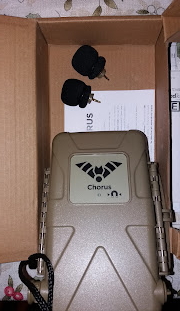
The Chorus - Shown with 2 Mics installed for audible sounds

The Chorus is shown above with 2 audible microphones installed (for recording of non-bat/non-ultrasonic sound). My sample/loaner unit was provided with the ultrasonic microphone as well; so there will be plenty of testing and results shared here... I already got a serendipitous recording of a Big Brown Bat (Eptesicus fuscus) using this new unit!

External Dimensions: 194 x 123 x 50mm (7.3 x 4.8 x 2 inches)
Weight: 400 grams (14 Oz.) Without batteries

The Chorus is a very solid unit. It's molded in a Shrub Green weatherproof and shockproof housing. It's a well laid-out design, similar to several other weatherproof, static recorders on the market.
However, a user should be advised/reminded: When closing The Chorus, for deployment, you must insure you hear a loud snap when you close the latch. Which, again, is similar to other static recorders currently on the market.

In other words, it is possible for someone who is unfamiliar with such devices - to close the unit, "close" the latch, and deploy the unit: Not completely sealed against the elements - without it being properly closed & sealed.

I've made a very short video, demonstrating exactly what I'm referring to. On my Bat Detector Reviews YouTube Channel - It may be seen Here.


The Titley Chorus (please ignore the cheap batteries!)

I'd like to discuss another issue straight away: something else, which was a concern of mine since it's arrival: Our local super-cold temperatures / and how in the world was The Chorus going to fare?

It's not as though I didn't have my local wildlife vocalizing (due to cold weather). On the contrary: Barred Owls (Strix varia) and Eastern Coyotes (Canis latrans) treated us to performances just about every night.


No, it was my concern (my "worry") about whether or not The Chorus would be able to perform in such cold conditions...
After a quick scan through the User Manual, what I'd vaguely suspected was confirmed: It is the batteries' ability to provide voltage (in below freezing Temps) and not The Chorus which is the deciding factor. 
That is to say, when deploying the unit in sub-freezing environments (< 32 Degrees Fahrenheit / 0 Degrees Celsius).
Temperatures here were commonly <23 Deg F/ -5 Deg C at the time that I began testing (and much, much colder since then). ...It's the batteries which are "the weakest link', and not the machine.

How can you ensure best performance in cold weather? 
The short answer: Use Lithium batteries (as many of you are already aware).
To ensure the very best performance and longevity - It would be wise to go for the best (most highly rated brand(s) you can get). Energizer brand Lithium batteries are very good:


The Energizer brand Lithium batteries are reported to "Perform well in extreme temperatures from -40°F to 140°F." I have found them to perform admirably in my local (Upstate New York) conditions.

Eneloop brand rechargeable NimH batteries are still a very good bet, as a second choice. Especially for use in non-freezing weather conditions. I have a good selection of batteries available here: From the very cheapest (untrustworthy) -to- the top of the range. I also have a tendency to try the different brands in the detector(s) I'm evaluating. So far, I haven't experienced anything out of the ordinary to report.


The Titley Chorus may be ordered from a number of Dealers. Such as NHBS:


As well as directly from Titley Scientific - Here. (for $499 [US Dollars] with one free acoustic microphone).

Via either one of the links above, you may select the preferred configuration when ordering. Generally speaking, these are:
  • Chorus with one (free) acoustic microphone
  • Chorus with an additional acoustic microphone (giving you the set-up shown in my photos above).
  • Chorus with an (additional) ultrasonic microphone.

The Chorus powered-on in subdued light


Some key features:
  • The ability to add additional microphones - Both acoustic, and ultrasonic (more on this later).
  • Lasts for up to 40 nights (full spectrum ultrasonic) or 300 hours (acoustic) on 4 AA sized batteries.
  • It is a static recorder, which operates unattended -and- No phone apps are required for setup.
  • Temperature sensor.
  • Transect mode available!
  • Bar graphs on main display show a live representation of sound levels picked-up by unit.

The bottom of The Titley Chorus - Showing the tripod socket

I like the ease with which you can navigate the menus; the main screen is called the Dashboard.
The unit is powered on by pressing the OK button.
There is a useful sticker inside the cover, which conveys the basic instructions. 

The Chorus would be a very good option for: An Ecologist, Bat Worker, Wildlife Researcher, et al, looking for a capable, unattended sound recording solution. Again, it is capable of recording both ultrasounds and normally-audible sounds.
As an experienced wildlife sound recordist, I'm immediately interested in any static recorder able to competently record audible sounds of wildlife. 
In fact, I couldn't help but to make comparisons of audible sound recordings from The Chorus versus a Zoom H1n digital recorder, which I use for impromptu wildlife sound recording! Now, we all know that this can't be considered a "fair" comparison - but, I couldn't help to experiment anyway!

To elaborate - The Zoom H1n recorder is designed from the ground up, to do one thing: record stereo sound as well as possible (within it's [low] cost constraints!).
The Chorus (and similar devices) must record wildlife - Reliably, accurately, over long periods of time, and in the most extreme weather conditions imaginable.
From the jungles of South America, to The Great White North (πŸ˜‰ Canada) and beyond... These are no small feats, by any stretch. 

Obviously, this product would be very well-suited for anyone needing to record ultrasonic and non-ultrasonic sounds. In other words - It would be a great match for Biologists working with animals which vocalize in both audible, and sub-audible (ultrasonic) spectrum.

This review is continued, in Part 2 of 2... Where I covered a bit more about this very capable recorder. 

Happy bat detecting! 

Saturday, January 15, 2022

The New Chorus from Titley Scientific - First Impressions

The New Chorus, static/stand alone recorder from Titley Scientific, is more than just a bat/ultrasound recorder. It is also a very capable audible sound recorder for capturing a myriad of wildlife vocalizations.

The type of unit it is, would commonly be referred to as a passive detector (when discussing bat recordings). 

It performs the same way, when it comes to wildlife sound recording. At the risk of oversimplifying - It is the type of recorder one would set-up in the field (be it woodland, swamp, mountains) and return to retrieve the SD card (recordings) after a period of many weeks. 


At this time, I'd like to share my "first impressions" synopsis...

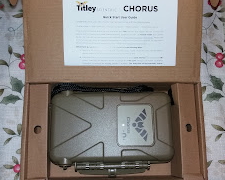
The new Chorus (occasionally referred to as The Anabat Chorus) is an impressive machine. It arrived (to me here in The US) from Titley's HQ in Australia, professionally well-packaged (as usual). When purchasing Pro-level equipment, from leading manufacturers - You'll find well-designed boxes/packaging, which keeps equipment well protected.


My loaner unit for test, is a full-production unit. The same as any customer around the world would receive. My particular unit was provided with one ultrasonic microphone (for bat recording, etc.) and two normal microphones (for most other wildlife vocalizations). 

Some of the very first aspects which struck me upon unboxing were:

  • It's very robust design. Reminiscent of a Hummer, or some other tough vehicle. Hefty and sturdy.
  • The interior of the unit, especially battery compartment and SD card slot - seem almost ergonomic (for lack of a better description). That is to say, I could install and remove the batteries & SD card very, very easily.
  • Each of the microphones may be installed & removed easily, with good tactile feedback. There's no mistaking whether or not the Mics are fully seated. 

I like the yellow display; and more importantly, the range of features which are easily accessible to the end user.

Until next post...

Happy bat detecting!

Monday, January 3, 2022

An Early Look At Something Coming Up Next - The Chorus from Titley Scientific

Well, this is a bit premature... But, in any case:

The brand new Chorus made by Titley Scientific has arrived, for testing and review. As with their other static recorders: It's very easy to set-up/deploy.

I couldn't help but to read the Quick Start Guide, and The User Manual; and subsequently, to do a short test deployment. To my surprise, it recorded a bat.

I was very surprised, since it was December (the 26th, to be exact). And the evening temperatures were right around 40 degrees F (for the most part).

As per the latest version of Kaleidoscope software, and manual IDing by yours truly - It was, in fact a Big Brown Bat (Eptesicus fuscus). The only question I have, is: Is it suffering from WNS? Or did it just wake-up for a drink of water? (at the nearby trout stream). For now, I can only speculate...

This new static unit from Titley works really well - and I've found zero negatives about it (except the slightly higher price).
I find no faults in it's design at all: Batteries and SD card are installed & removed effortlessly. 
I like the way it's ultrasonic microphone simply records bats (and not any other non-bat/non-animal sounds). Very neat so far!

So, as for The Chorus - I like it a lot so far! I look forward to posting Part 1 of the review soon...


Happy New Year & Happy bat detecting!


Monday, February 3, 2020

Review: The AnaBat Scout From Titley Scientific Part 2 of 2

Review: The AnaBat Scout From Titley Scientific Part 2 of 2

Let's begin with a quick summary, or overview of The AnaBat Scout - some of my first impressions:
As can be seen in the preceding posts (in Part 1 of this review, etc.) the AnaBat Scout arrives very well packaged and protected. I like the overall aesthetic of this unit; I can see that they have molded The AnaBat Scout into an ergonomic design. It is lightweight (with batteries installed), and it feels natural and comfortable in the hand.


A short video, demonstrating powering on The AnaBat Scout (with display set to Low brightness).

Amoung some of The Scout's features, are:
  •  The ability to record voice notes (as previously mentioned, the Mic for this is located above the display screen).
  •  Glow-in-the-dark buttons. In practice, I found that the buttons were not easy to "charge" (expose to a fairly bright light source). And not at all easy to see in the dark (out in the field, etc.).*
  •  It includes a protective case and lanyard.
*I couldn't help but to immediately think that Tritium would've been very effective, instead of the material currently used for the buttons. Although I have a feeling, that some Ecologists might object to it's use...

The built-in Bat Counter of The Anabat Scout will be a welcomed feature for Ecologists / Bat Workers performing emergence surveys, etc. It will record the date, time, and location with each button press, into a .csv file (commonly read with Microsoft Excel). By default, the increment (each In or Out button push) is 1, but may be increased up to 10. Interesting, and no doubt useful for unique situations.

The AnaBat Scout comes with the free version of Anabat Insight software, which you may download Here (there is a version for Mac as well as Windows). You will notice that the User Manual may also be obtained on that Web page.

I installed the 2 AA sized batteries required, as well as a new 16GB SD memory card (I happened to have available); and pressed the OK button to power on. The user is greeted with the OLED display, featuring text (and icons) of a yellowish-green colour.

Changing the brightness level, from High to Low


My (point & shoot) camera did not give an accurate representation of the display. It appears a bit too bright in this video. In reality, it looks clear, crisp, and not too bright.

I was glad to see that the display brightness is adjustable, from High to Low. Because I prefer to keep bat detector displays as dim as possible; especially when in the field.

Short video of powering off The AnaBat Scout.

To power off the detector, hold down the OK button - The display will read "Would you like to shutdown?" And you press the Yes soft key (on the right).

The Anabat Scout has the ability to have it's sensitivity (event trigger) changed; you may choose Low, Medium, or High (High is the default setting). Very useful, for those instances when bats are flying low and/or close.

Minimum frequency is 10 kHz, and maximum is 160 kHz (both are the default settings). Either/or may be adjusted to suit the situation, under Trigger Settings on the unit. Also by default, the Recording Mode is set to triggered mode; and this may also be changed to Constant Recording Mode, when and if needed.
 
Some of the features of The Anabat Scout, which I particularly like as seen on the display are: The GPS indicator, Number of Satellites in View indication, % of SD Card Memory Available, and Tuned/Peak Frequency.
Again, those doing emergence surveys will be pleased to see the Out and In Count.
A very clear representation of these features, may be seen on Page 6 of the (freely available) User Manual.
I would encourage the reader to have a look at pages 12-14 of the Manual, which describe further opportunities to fine tune aspects of: Triggering, Recording, File preferences, and various Audio Settings. 
For audio output - You may choose between heterodyne, frequency division (which is divided by 16) - Or, if using earphones, both! In other words, heterodyne is heard in one earphone, whilst FD is heard in the other.


Some additional features which I liked were: 

When a recording is triggered, a recording symbol appears, on the bottom center of the display.
The Heterodyne auto-tune - Described on page 14 of the User Manual. 
Transect Mode - Which uses the built-in GPS to save your track as a .gpx file (it checks GPS points once per second).
The Anabat Scout also has the ability to run diagnostics on itself (should the need arise).

A user may also subscribe to receive email alerts, whenever Scout firmware is updated; very neat!
The process of updating the firmware is just what you might expect: You copy the (scout.adx) file to the root of the SD card, insert SD card, and power on the unit. At which point, you will be asked "...Would you like to update now?". At which point you'd press Yes, and wait for it to complete the update. After which, it will restart itself.

During my extensive testing, I found the the AnaBat Scout's microphone to not only be substantially sensitive, but to produce accurate-sounding results (audio tones) from the front-facing speaker. Careful analysis of the recorded bat calls, further confirmed the sensitivity, range, and overall accuracy of it's recording abilities.

I found The Anabat Scout to have sensitivity and range comparable to many other Professional-level bat detectors. Especially within it's price range. A couple of species of my local (North American) bat species, were recorded at distances of 100 meters.
See pages 20 to 21 of the User Manual, for a concise answer to the question: How far away can a bat be detected?

Pros:
  •  Bat emergence In and Out Counter (separate button for each).
  •  Excellent sensitivity and pick-up range of bat calls.
  •  Pleasing (and adjustable) OLED display, preserves a user's night adapted vision; while providing live pertinent information.
  •  GPS/transect and logging capabilities.
  •  Adjustable sensitivity, and frequency range.
  •  All metadata recorded on The Scout is saved to files in the GUANO (Grand Unified Acoustic Notation Ontology) format.

Cons:
  •  Not weatherproof.
  •  Glow-in-the-dark buttons need improvement.

The Scout has excellent features of value to Ecologists and Bat Workers who are tasked with doing bat emergence surveys. In addition to many of the capabilities one would expect from a Pro-level bat detector, it possesses some which are specifically geared towards bat emergence surveys.
The Anabat Scout also records metadata -
All metadata recorded on The Anabat Scout, is saved to files in the GUANO (Grand Unified Acoustic Notation Ontology) format. This format is now the industry standard in the field of bat acoustic studies. Details regarding this configuration may be seen on page 20 of the User Manual.


More will be added to this (part 2) Anabat Scout review soon...

Amoung the next items to be reviewed here, are some interesting new microphones designed by Titley, for use on their AnaBat Swift detector.

Happy bat detecting!

Tuesday, January 14, 2020

Review: The AnaBat Scout From Titley Scientific Part 1 of 2

Review: The AnaBat Scout From Titley Scientific Part 1 of 2

The AnaBat Scout is a full spectrum bat detector, designed to be used for active bat detecting. 
I will state from the start, that I have used it as a passive bat recorder on more than one occasion, and acquired excellent recordings of bat calls.

The Anabat Scout arrived directly from Titley (Australia) very well packaged & packed. The box which contains The AnaBat Scout is seen in the photo below:

AnaBat Scout box, along with included Quickstart User Guide


The AnaBat Scout is 150mm long by 74mm (at it's widest point) and 38mm thick. For U.S. readers, this translates to 5.9" x 2.9" x 1.5" in thickness.
It weighs 160 grams (5.64 ounces) without batteries installed. NiMh, Alkaline or Lithium type batteries may be used. The AnaBat Scout runs on 2 AA size batteries.

If purchased directly from Titley Scientific, The AnaBat Scout is going for $850 U.S. dollars.

NHBS also has them in stock:


As well as Wildlife And Countryside Services (UK)

The AnaBat Scout has the ability to listen to bat calls in real time, in either: Heterodyne, auto-heterodyne, or frequency division audio modes. 

It also has the ability to record in either zero crossing or full spectrum mode. The AnaBat Scout also features a built-in GPS for transect mode and geotagging. It also has an In & Out bat counter, with automatic time stamping and geotagging; as well as the ability to record voice notes. 
These are all excellent features for bat surveys.

The AnaBat Scout comes with a free version of AnaBat Insight software. It is also provided with a lanyard, a protective carry pouch, and glow-in-the-dark buttons.


The AnaBat Scout has an easy to use robust design, with a front-facing mic element. With the Mic for voice notes located just above the (OLED) screen, facing the user. It has an easy-to-navigate keypad, located just beneath the display.

Before you begin recording bats with the AnaBat Scout: It is advisable, to set the current time zone. If this isn't done, the time stamps on your recordings will be incorrect. 

The AnaBat Scout worked very well as an unattended recording device, despite the low temperatures.


The AnaBat Scout would serve as an ideal unit for both Professionals; and amateur naturalists, who enjoy using a full-featured bat detector.

The AnaBat Scout would be an excellent tool for Professional Bat Workers who frequently perform roost surveys and/or emergence counts, since it has a built-in In and Out Counter - More on this, in Part 2 of the review.

The construction of the AnaBat Scout itself, feels very solid. There are no protruding parts on the unit, which you need to worry about breaking off, or damaging. 
The Scout packs a lot of technology and features into a fairly small, and easy to handle unit. I've found The AnaBat Scout a joy to use, with it's slightly curved design fitting quite comfortably in the hand, and it's front-facing microphone. 

Of course the omni-directional microphone itself, is larger in size than the opening (seen upon closer look at the front panel). This is a clever way to keep the mic element protected, from any would-be harm encountered while outdoors.

Once your main settings have been set, and your preferences selected, it only takes a few button presses - To begin monitoring, recording, or even un-attended recording (one of my favorite methods). The process of using The Scout will be covered in detail in Part 2 of this review.
After an evening of recording, and inserting the unit's SD card into the laptop: I was able to easily select and manage large numbers of bat recordings.

I did manage to run through one set of AA-sized batteries...This is the warning displayed, when batteries are low.

I'm happy to report, that when the Anabat Scout arrived here (in the Northeastern U.S.) in late October (2019) my local bats were still active; and they provided me with excellent recording opportunities!
Overall, I have been very pleased with the overall performance and accuracy of The AnaBat Scout from Titley. I also admire the fit, finish, and attention to detail demonstrated in it's design; and functionality!

Much more to follow soon, in Part 2 of this review. Which will cover out-of-box set up, ease of use, recordings & resulting spectrograms, etc.

Happy bat detecting!

Sunday, November 3, 2019

A Recent Arrival! The AnaBat Scout Bat Detector From Titley Scientific!

I'm pleased to report the recent arrival of the latest (new) bat detector offered by Titley Scientific - The AnaBat Scout!

I'm happy to report, that it arrived here (from Australia) several days ago. And made it here (to NorthEastern U.S.) in time to record some bats!

The AnaBat Scout arrived well packaged & protected from Titley Scientific

There were bats recorded as late as October 30th (none on the 31st, I'm sorry to say). This is great news for the upcoming testing and review.
For now, I can say that it is a charming bat detector, with many nice features which Pros will enjoy! Bat calls (in Heterodyne output mode) sound great! Volume for audio output goes from 0-25. I found it to be quite pleasing at a setting of ~18 for unattended recording (near an open door or window).


Having a quick look around with The AnaBat Scout bat detector from Titley

Bat detecting is on-going, and as always, I will hold out hope on any nights of 50 degrees Fahrenheit or above. I'm also excited about two additional microphones, received for testing, from Titley Scientific. These are for The AnaBat Swift (recently reviewed here). I will probably need to resort to artificial/electronic bat calls for testing; more on those later.

In the short video clip below, we see The AnaBat Scout in action - As it first senses (and begins recording) a bat call, the recording activity indicator may be seen illuminating. A round indicator, in the lower center of the display. You can also hear the (heterodyne) sound produced as the bat flies by. 
This happened to be one of my "resident" Big Brown Bats (Eptesicus fuscus); and it was flying fairly close.


The AnaBat Scout recording a backyard bat on October 28th
(upstate New York)

In addition, on October 30th, The AnaBat Scout got a great recording of a bat, from a distance of approximately 35 meters. It was at 7:20 PM (19:20), sunset was at 5:52 PM, temperature was 59 Deg. Fahrenheit, humidity of 99%, with wind from SSE at 6 MPH.
 
Part 2 of 2 of The BCID software is also in progress...

Happy bat detecting!

Saturday, July 27, 2019

Review: The AnaBat Walkabout Bat Detector Part 2 Of 2

Review Of The AnaBat Walkabout Bat Detector - Part 2 Of 2

The AnaBat Walkabout bat detector from Titley Scientific, is a high-quality bat detecting/recording device, with an abundance of features.

One of the reasons for this, is The Walkabout is built upon an Android tablet. Not an off-the-shelf / consumer tablet, but one specifically designed (from scratch) to be The AnaBat Walkabout. Being built upon such a versatile foundation has it's advantages.

One of the things which I admire about The AnaBat Walkabout, is how robust it is. It is very reliable. Not prone to crashing, or freezing-up, the way a low-cost tablet might.


An excellent guide to the features, buttons, and ports of The AnaBat Walkabout (Thanks to NHBS)
    

During the testing of The AnaBat WalkAbout, I left the microphone's sensitivity at the default setting (as from the factory). 
If (you are fortunate enough) to have bats flying low, or close to you: You may want to change the sensitivity, to a lower setting. If not, you are likely to end up with spectrograms containing prominent harmonics - As seen in my example below:


A (partial) screenshot, of a bat recorded with The Walkabout. As viewed with AnaBat Insight software.


As a continuation from Part 1 of this review, here are some additional specific features which I particularly like:


  • All of the methods available for bat detection: Listening to the audio of bat calls, which are - FD, Het, FS, TE.
  • The recording methods available: Zero-Cross, Full Spectrum, and a combination of both (simultaneously).
  • Being able to select a frequency range as low as 5kHz - Enables me to target and record many species of Orthoptera (singing insects).
  • Additional (2.5mm) jack for use with external (Ultrasonic) Mics.

If you enjoy tinkering with electronics - especially, DIY Ultrasound Mics (as I do), then you may find the last bullet point above particularly interesting. 
I will inform you, that all of my early attempts/tests, with DIY microphones, were unsuccessful. This need not deter the reader from carrying out their own experiments.
I eventually came to the conclusion, that it would be best to stick to purchasing the official Titley microphone adapter and Mic, if there is a need.

In my case, having wasted so much time trying to build a working Mic, only bolstered my appreciation of the quality recordings captured with The Walkabout's built-in (Knowles) microphone. As is, The Walkabout is able to pick up bats at respectable distances; and produce excellent spectrograms while doing so.

Here is the optional Microphone Adapter, made for The AnaBat Walkabout from Titley:


Link to Titley's page on it Here.


The Walkabout's battery life is stated as being 8-12 hours (in The User Manual). This matches my experience while testing as well. 
I plugged The Walkabout into the mains, with a completely flat battery, at 7 PM - And it was fully charged at 12 AM. This was early-on in the testing phase (first week of use). Actual discharge/charge times may vary (most likely, improve) with regular use (since it is a rechargeable, Lithium ion battery).

Zooming-in on the (combo) FS/ZC displayed in Insight software

What's it like, getting and using The AnaBat Walkabout? 
Allow me to make (another) analogy - Back when I was into the keeping of Mini-Reef aquariums. Something which was a lot of fun, was buying a piece of Live Rock... After situating it in the tank, and as the days went by: I would discover several fascinating & colourful creatures inhabiting the nooks & crannies of the piece of rock. And it was like little unexpected bonuses!
Well, it's a bit similar to using The Anabat Walkabout, as you:
Read the manual, and start using it - You begin to discover all these neat little features; which you didn't realize were there. 

A great example of this, is when I discovered 'Basic Mode' (shown below). It is a completely different looking interface (listening in heterodyne mode) while recording. With several neat features: Live Temperature, Lux, and Humidity sensor readouts, as well as an electronic compass! 


In summary, I'd place The AnaBat Walkabout in the same class as other "Alpha" bat detectors; such as: 


If you were considering one of these, you would be remiss not to include The AnaBat Walkabout on your list of potential prospects. 
In fact, depending on which specific abilities, and features you need or want - You'll probably find that you prefer The AnaBat Walkabout to the others.
There's no denying that The AnaBat Walkabout has many more features than those listed above. 
 
The Walkabout is very easy to use:
  • Press Power on button, for 2.5" - AnaBat insignia comes up as a splash screen.
  • Check your Audio and Recording method preferences. 
  • Tap the Microphone icon, to turn on the Mic (icons turn yellow to indicate "On" status.)
  • Select Auto or Manual recording...
  • And you are detecting/recording bats!

I have found The AnaBat Walkabout to consistently produce accurate, and detailed recordings of bat calls. Which in turn, facilitates production of excellent spectrograms.

Note that you may use/analyze bat recordings made with Tiley detectors on bat call identification software (such as BCID or Kaleidoscope). I've had no issues doing so. But, you cannot view bat recordings made with other manufacturer's  detectors in the free version of AnaBat Insight - You may view recordings from any detector when using the paid (full) version of the software.

Here are some links to the additional (optional) accessories, offered by Titley for The AnaBat Walkabout:

Screen Protector

Silicone Case

USB Power Bank
  
Microphone Adapter

The next bat detector to be tested and reviewed will be The (brand-new!) AnaBat Scout from Titley Scientific. It's always exciting to test and review a brand-new bat detector; and I'm really looking forward to it! 


Until then...

Happy bat detecting!

Tuesday, July 16, 2019

Review: The AnaBat Walkabout Bat Detector Part 1 Of 2

Review Of The AnaBat Walkabout Bat Detector - Part 1 Of 2

The AnaBat Walkabout is a feature-rich, professional bat detector from Titley Scientific
The Walkabout has been designed and built from the ground up by Titley, to be a very versatile bat detecting device. As a top-of-the-range bat detector, it possesses an abundance of features. It just so happens, that it also functions as a complete Android tablet as well.


The AnaBat Walkabout configuration screen


The AnaBat Walkabout arrives in a well packaged box, with a good amount of protection:


Some accessories included as standard

The Walkabout, in it's molded plastic tray


See photos above, to have a look at the accessories included as standard. Including wall plug adapters, allowing you a convenient way to switch from US wall plug to European or UK wall plugs. This bat detector/recorder, is intended for active bat detecting. But, during my test period, I've used it many times as a passive bat recorder, where it has performed admirably. A suitable windowsill is the only prerequisite, one with a screen installed is preferred!


For a quick overview of The AnaBat Walkabout, have a look at this video made by Titley Scientific. 
And you can get an excellent overview of this bat detector's features, by visiting Titley Scientific's page on it Here.

As for The AnaBat Walkabout's User Manual, quick, illustrated, looks at button functions and screen features, may be seen on pages: 8, 13, 14, 29, 37.

Here are some other pages which I found particularly interesting; and helpful in understanding what The Walkabout can do:
  • Features Of The AnaBat Walkabout   Page 7
  • AnaBat Walkabout Basic Operation   Page 11
  • Scroll Wheel And Quick Menu Settings   Page 15
  • Audio Settings   Page 20
  • Audio Feedback Reduction, Dynamic Range Compression   Page 25
  • Sleep And Screen Off Mode   Page 27
There is much more to see and read, of course.

Essentially, The AnaBat Walkabout itself, is a very versatile bat detector. You can listen to, record, and view bat calls in a myriad of different ways (and in many combinations). It's like The Swiss Army knife of bat detectors.

By now, most have seen an advertisement or two featuring Titley's Walkabout. At first glance, most would (naturally) make a few assumptions: 
  • It has a large (5") colourful display with live spectrograms.
  • It appears to be comfortable to use in the field (one-handed operation). 
  • It's made by Titley Scientific, so being a good quality instrument is a foregone conclusion.


However, after testing it nightly since it's arrival, this device seems to be quite a bit more than that. So much so, that I'd feel more comfortable referring to it as a system (rather than just a bat detector).
It's more like a portable, easy-to-use, bat recording lab. With the added advantage of being a fully-functioning Android tablet as well! 
The built-in GPS tracking works wonderfully, and gives the user two screens to choose from:
  • A half sonogram / half GPS display.
  • A full GPS/Map display.
 
Half sonogram / Half GPS display option
Full GPS display option


It's very accurate and excellent for both walking and driving transects. 


AnaBat Walkabout in Android tablet mode


Here are some of the specific features which I particularly like:

  • A choice between Heterodyne, or Auto-Heterodyne audio output. There are several other monitoring choices to choose from (but I find these two most pleasing).
  • Built-in GPS.
  • Wi-Fi.
  • Selectable frequency range of 5-200kHz (useful for recording Orthoptera).
  • 16 bit resolution, and a 500kHz sample rate.
  • Temperature, Lux, and humidity sensors.

In regards to this last bullet point, the ability to record temperature, humidity, and Lux (ambient light levels) is important to professionals (and even some amateurs/hobbyists). 
Obviously, when recording bats (and documenting their behaviour, etc.) this data is very useful. It helps us to learn more about the habitats, habits, and behaviors of bats. And how these external conditions influence and affect their activities.
Even as a hobbyist first starting out, I made a habit of recording temperature, documenting other weather conditions, and wind speed. 
Many years ago, it was fun to see if I could disprove / dispel the beliefs that bats won't fly: Below certain temperatures, certain amounts of wind, and/or rain.


AnaBat Walkabout in 'Basic Mode' - (GPS coordinates blocked for privacy).
 

For those considering The AnaBat Walkabout, I'd like to point out something which became obvious to me during the test period. The recordings made by The Walkabout, are: High-quality, high resolution (up to 500kHz sample rate) recordings, which any Professional (Ecologists, Bat Workers, et al) would be pleased to work with. Due in large part, to the detailed spectrograms produced. 

The unit itself weighs 14.6 ounces (415 grams), and measures 7.1 x 3.9 x 1.1 inches (180 x 100 x 28mm). 
Generally speaking, it is among the heavier bat detectors I've reviewed. However, the included hand strap does make it much more comfortable, and easy to hold for extended periods. I've only found it to be slightly uncomfortable after using it in the field for several consecutive hours.  
In summary: During longer bat detecting sessions (4-5 hours), you may find it just a little tiring. There will obviously be some variation from individual to individual.


AnaBat Walkabout's Full-Spectrum mode is another favorite of mine

I feel that any added heft, serves as a reminder that what you're holding isn't a toy. It's a high-end (Pro-level) bat recorder, and should be treated as such (with care!). Even though The Walkabout is very well-built, robust, and not easily damaged - being very careful is a habit of mine.

Most places, including Titley, have The AnaBat Walkabout on sale for $1,595 - Or £1,599.00 if you were to order from NHBS or Wildlife & Countryside Services

The AnaBat Walkabout is designed in a very sturdy plastic housing (in what one might call "Signature Titley yellow"), with a removable dark gray Directional Cone. When attached, it provides directional characteristics to the front-facing, built in (Knowles) microphone. 
The gray Directional Cone also provides an excellent level of protection to the Mic element. This is achieved simply by having the Mic element effectively recessed. I'm very pleased to see this! I feel that some (high-end) bat detectors have their Mics too exposed/unprotected, sometimes simply protruding.

The nice thing about The Walkabout, is that it can be used with it's default settings (out-of-the-box) in situations where:
  • You would like to get started quickly.
  • You are using it for some general bat detecting. 
  • You are a hobbyist or don't have a lot of experience.
And can also be used in situations where all of the advanced features can be brought to bear:
  • During transects, surveys, and other professional endeavors.
  • You would like to make full-spectrum, high resolution (500kHz) recordings.
  • You would like to get close (zoomed-in) looks at the live spectrograms in the field (to help with immediate ID (if one is sufficiently skilled).
  • You would like to view spectrograms in zero-cross, and/or full-spectrum mode.
To summarize, you can use this detector in a quick & easy manner, utilizing the default settings -Or- You can familiarize yourself with it's myriad of features, and fully customize the way it records, as well as the information displayed as it does so.


AnaBat Walkabout in Zero Crossing mode


The AnaBat Walkabout would be well-suited for both amateur and professional users. Amateurs and hobbyists will enjoy things like: It's ease of use, impressive appearance, and included standard accessories. As well as optional accessories.

Professionals will appreciate things like: Performance, sensitivity, and the myriad of customization available (in both the recording & display choices/features). There are several, which I plan to cover more in Part 2 of this review.
It would be well-suited for professionals / researchers who have already decided on Anabat Insight as their software platform of choice for analyzing bat calls.

I found The Walkabout to be very sensitive, and accurate in what it detects. The ability to trim it's frequency response will be a very welcomed feature; especially for professionals.

Pros:
  • Many types of audio settings to choose from (Heterodyne, Auto-Heterodyne, Frequency Division, Full Spectrum, Time Expansion).
  • Live spectrograms: Several types and combinations of displays to choose from (Heterodyne; Zero-Crossing and/or Full Spectrum).
  • Built upon a fully-functioning, Android tablet (WiFi, etc.)
  • Built-in, rechargeable, 7000mAh Lithium Ion battery.
  • AnaBat Insight bat call analysis software is free.
  • Operating system (and more importantly), the Walkabout system itself, may gain additional features, etc., through dynamic software/firmware updates.

Cons:
  •  May be considered expensive. 
 
 
Much more to follow, in Part 2 Of 2 of this AnaBat Walkabout bat detector review. 


Until then, 
Happy bat detecting! 

Looking for The Next Bat Detector for Review!

Well… For now, I’d just like to say Thank You to The Netherlands! πŸ‡³πŸ‡±  There will be 2 new bat detectors tested and reviewed here in the ne...