Showing posts with label Titley. Show all posts

Sunday, March 13, 2022

Review: The New Chorus from Titley Scientific Part 2 of 2

The Chorus from Titley Scientific: Review - Part 2 of 2


The Chorus

The AnaBat Chorus - First time use:

Connect the microphone(s) you intend to use, in their appropriate sockets (these are also labeled A & B in raised lettering directly on the unit - look closely).

Install new (or formatted) SD card, 4 new AA size batteries; power-on by pressing the 'OK' button...Give the unit half a moment to boot up (in reality, it only takes a few seconds).

Check that the time zone is correct (Clock Settings) - Press OK to confirm. Remember daylight savings time. Allow unit to acquire GPS satellite lock - And accurate time will auto-update. 

Note: You should be aware of whether or not your unit is up-to-date as far as firmware is concerned. My example unit was up-to-date on arrival.  

Select one of the pre-set modes on the right of the screen.

Clam-shell the unit closed (make sure you hear the audible click) and deploy unit.

For most intents and purposes, you'll be well on your way to acquiring excellent quality recordings, simply by following the instructions above. Which are also well-laid-out in The Quick Start Guide. This presumes you are in a hurry to deploy the unit (or possibly more than one). Please be aware: If you don't perform any further configuration, your Chorus will be using all the default settings. 


AnaBat Chorus with Lithium batteries installed

I always outline the quickest deployment scenario, for those who are interested. And that is what I've just outlined. However, for many other users, you'll want to become familiar with the other settings which may be customised. In the very beginning, you may want to have a printed version of the User Manual handy.

I read the Quick Start Guide, and deployed the Chorus - I was quite surprised to have recorded a bat! It was on December 26th, and it was 40℉ (4.4℃) - It was later identified as a Big Brown Bat (Eptesicus fuscus).

The fully detailed, step-by-step Set-Up Guide may be found on page 13 of the User Manual.

Amoung the features which are adjustable are:

  • Gain (for side A or B, independently).
  • Start / Stop times for active monitoring/recording.
  • Minimum & maximum frequency.
  • Minimum & maximum recording time.

The AnaBat Chorus runs on four AA sized batteries, which can be of any type (Alkaline, NiMh, or Lithium).
The Chorus also features a Micro USB connection, primarily for updating the unit's firmware. As well as a standard 3.5mm headphone jack, for live monitoring of sounds being picked up by the microphones.
During my tests, I tried various brands/types of batteries; as well as different SD/MicroSD cards - No issues were encountered.
During my extensive testing, I put The Titley Chorus through it's paces; including some deployments in sub-freezing temperatures. In all cases, I found the microphones to perform accurately, without any issues capturing and reproducing sound.

Even in this condition:


As per Page 10 of The User Manual:

Amoung the Acoustic Microphone Specifications we have:
  • Electret mics with excellent sensitivity and low noise floor: -24dB sensitivity, with 80dB signal-to-noise ratio.
  • Built-in low noise preamplifiers.
  • Frequency response of 20Hz to 20kHz.


For the Ultrasonic Microphones we have:
  • Weatherproofing, for use in rainy conditions.
  • Built-in low noise preamplifier.
  • Improved frequency response, when compared to previous generation electret-based ultrasonic Mics.
  • Useable frequency response of 10kHz to 140kHz (response rolls-off beyond this point) - Which would be interesting to experiment with...
These are great specifications.

The Barred Owl (Strix varia) calls, recorded with The Chorus (in stereo/2 Audible Mics) may be heard on my YouTube Channel (Batdetectors1). Distance to unit: Approximately 75 Meters.


Eastern Coyotes were approximately three times as far; which is probably why I have yet to locate a solid recording worthy of sharing…


The Chorus produced excellent sounding recordings, both in acoustic mode and ultrasonic mode: The file names of acoustic recordings may be set to have an "ac" prefix. While the ultrasonic recordings may be set to have a "us" prefix.


Pros:
  • Robust construction.
  • Very flexible - Due to dual Mic options.
  • Ability to record in FS or ZC.
  • Independently adjustable gain (for each Mic).
  • Myriad of versatility: The ability to schedule Ultrasonic and/or Acoustic recording for different times of the day (24 hour period).
  • The quality of the recordings are excellent.

Cons:
  • May be considered expensive, when factoring in the cost of an additional Mic.
  • Not as quick to deploy as the AnaBat Express or AnaBat Swift: Having more features and abilities, equates to more time to configure before deployment.
  • AnaBat Insight software not as fast or robust as others.

The Chorus may be purchased directly from Titley Scientific (main Website).
You will also find it in stock at many Dealer's Sites, including Wildlife & Countryside Services and at NHBS.

The Titley Chorus - Things I happened to like and dislike:

I liked the robust build, the simple Dashboard/4 icons, the choice of Mics, and relative flexibility of settings like: Filter, independent gain for microphones (A/B).

I didn't like the time and effort required to go from power-up ~to~ deployment. Again, since The Chorus has more features and variables available, this equates to a bit more time to configure.

If you haven't read it already, see Part 1 of this 2-Part review Here.

As is the custom for Titley Scientific devices - there is a hidden game on this unit as well... It's called 'FlappyBat' and I must say, it's rather cute. Here's how you can access the game:

When you hold down the Power button to turn off the detector, You'll see the menu pop-up that lets you choose between sleep and power down. At this menu, press the mode button and a new icon will appear. Arrow across to this one and press OK...

The latest (auto) update/version of AnaBat Insight software has really made a difference in overall performance! A lot of major and minor issues have been addressed with this latest update. It's much more robust now (noticeably better overall). I experienced no freezing of the application, even on my slowest laptop.


Until next time - Happy bat detecting! And animal recording!
🐾🐺🐦🐸

Thursday, February 10, 2022

Review: The New Chorus from Titley Scientific Part 1 Of 2

Review: The Chorus from Titley Part 1 Of 2 

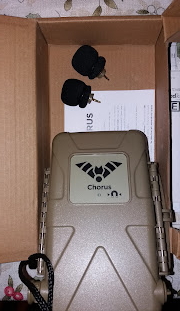
The Chorus - Shown with 2 Mics installed for audible sounds

The Chorus is shown above with 2 audible microphones installed (for recording of non-bat/non-ultrasonic sound). My sample/loaner unit was provided with the ultrasonic microphone as well; so there will be plenty of testing and results shared here... I already got a serendipitous recording of a Big Brown Bat (Eptesicus fuscus) using this new unit!

External Dimensions: 194 x 123 x 50mm (7.3 x 4.8 x 2 inches)
Weight: 400 grams (14 Oz.) Without batteries

The Chorus is a very solid unit. It's molded in a Shrub Green weatherproof and shockproof housing. It's a well laid-out design, similar to several other weatherproof, static recorders on the market.
However, a user should be advised/reminded: When closing The Chorus, for deployment, you must insure you hear a loud snap when you close the latch. Which, again, is similar to other static recorders currently on the market.

In other words, it is possible for someone who is unfamiliar with such devices - to close the unit, "close" the latch, and deploy the unit: Not completely sealed against the elements - without it being properly closed & sealed.

I've made a very short video, demonstrating exactly what I'm referring to. On my Bat Detector Reviews YouTube Channel - It may be seen Here.


The Titley Chorus (please ignore the cheap batteries!)

I'd like to discuss another issue straight away: something else, which was a concern of mine since it's arrival: Our local super-cold temperatures / and how in the world was The Chorus going to fare?

It's not as though I didn't have my local wildlife vocalizing (due to cold weather). On the contrary: Barred Owls (Strix varia) and Eastern Coyotes (Canis latrans) treated us to performances just about every night.


No, it was my concern (my "worry") about whether or not The Chorus would be able to perform in such cold conditions...
After a quick scan through the User Manual, what I'd vaguely suspected was confirmed: It is the batteries' ability to provide voltage (in below freezing Temps) and not The Chorus which is the deciding factor. 
That is to say, when deploying the unit in sub-freezing environments (< 32 Degrees Fahrenheit / 0 Degrees Celsius).
Temperatures here were commonly <23 Deg F/ -5 Deg C at the time that I began testing (and much, much colder since then). ...It's the batteries which are "the weakest link', and not the machine.

How can you ensure best performance in cold weather? 
The short answer: Use Lithium batteries (as many of you are already aware).
To ensure the very best performance and longevity - It would be wise to go for the best (most highly rated brand(s) you can get). Energizer brand Lithium batteries are very good:


The Energizer brand Lithium batteries are reported to "Perform well in extreme temperatures from -40°F to 140°F." I have found them to perform admirably in my local (Upstate New York) conditions.

Eneloop brand rechargeable NimH batteries are still a very good bet, as a second choice. Especially for use in non-freezing weather conditions. I have a good selection of batteries available here: From the very cheapest (untrustworthy) -to- the top of the range. I also have a tendency to try the different brands in the detector(s) I'm evaluating. So far, I haven't experienced anything out of the ordinary to report.


The Titley Chorus may be ordered from a number of Dealers. Such as NHBS:


As well as directly from Titley Scientific - Here. (for $499 [US Dollars] with one free acoustic microphone).

Via either one of the links above, you may select the preferred configuration when ordering. Generally speaking, these are:
  • Chorus with one (free) acoustic microphone
  • Chorus with an additional acoustic microphone (giving you the set-up shown in my photos above).
  • Chorus with an (additional) ultrasonic microphone.

The Chorus powered-on in subdued light


Some key features:
  • The ability to add additional microphones - Both acoustic, and ultrasonic (more on this later).
  • Lasts for up to 40 nights (full spectrum ultrasonic) or 300 hours (acoustic) on 4 AA sized batteries.
  • It is a static recorder, which operates unattended -and- No phone apps are required for setup.
  • Temperature sensor.
  • Transect mode available!
  • Bar graphs on main display show a live representation of sound levels picked-up by unit.

The bottom of The Titley Chorus - Showing the tripod socket

I like the ease with which you can navigate the menus; the main screen is called the Dashboard.
The unit is powered on by pressing the OK button.
There is a useful sticker inside the cover, which conveys the basic instructions. 

The Chorus would be a very good option for: An Ecologist, Bat Worker, Wildlife Researcher, et al, looking for a capable, unattended sound recording solution. Again, it is capable of recording both ultrasounds and normally-audible sounds.
As an experienced wildlife sound recordist, I'm immediately interested in any static recorder able to competently record audible sounds of wildlife. 
In fact, I couldn't help but to make comparisons of audible sound recordings from The Chorus versus a Zoom H1n digital recorder, which I use for impromptu wildlife sound recording! Now, we all know that this can't be considered a "fair" comparison - but, I couldn't help to experiment anyway!

To elaborate - The Zoom H1n recorder is designed from the ground up, to do one thing: record stereo sound as well as possible (within it's [low] cost constraints!).
The Chorus (and similar devices) must record wildlife - Reliably, accurately, over long periods of time, and in the most extreme weather conditions imaginable.
From the jungles of South America, to The Great White North (πŸ˜‰ Canada) and beyond... These are no small feats, by any stretch. 

Obviously, this product would be very well-suited for anyone needing to record ultrasonic and non-ultrasonic sounds. In other words - It would be a great match for Biologists working with animals which vocalize in both audible, and sub-audible (ultrasonic) spectrum.

This review is continued, in Part 2 of 2... Where I covered a bit more about this very capable recorder. 

Happy bat detecting! 

Saturday, January 15, 2022

The New Chorus from Titley Scientific - First Impressions

The New Chorus, static/stand alone recorder from Titley Scientific, is more than just a bat/ultrasound recorder. It is also a very capable audible sound recorder for capturing a myriad of wildlife vocalizations.

The type of unit it is, would commonly be referred to as a passive detector (when discussing bat recordings). 

It performs the same way, when it comes to wildlife sound recording. At the risk of oversimplifying - It is the type of recorder one would set-up in the field (be it woodland, swamp, mountains) and return to retrieve the SD card (recordings) after a period of many weeks. 


At this time, I'd like to share my "first impressions" synopsis...

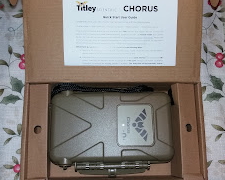
The new Chorus (occasionally referred to as The Anabat Chorus) is an impressive machine. It arrived (to me here in The US) from Titley's HQ in Australia, professionally well-packaged (as usual). When purchasing Pro-level equipment, from leading manufacturers - You'll find well-designed boxes/packaging, which keeps equipment well protected.


My loaner unit for test, is a full-production unit. The same as any customer around the world would receive. My particular unit was provided with one ultrasonic microphone (for bat recording, etc.) and two normal microphones (for most other wildlife vocalizations). 

Some of the very first aspects which struck me upon unboxing were:

  • It's very robust design. Reminiscent of a Hummer, or some other tough vehicle. Hefty and sturdy.
  • The interior of the unit, especially battery compartment and SD card slot - seem almost ergonomic (for lack of a better description). That is to say, I could install and remove the batteries & SD card very, very easily.
  • Each of the microphones may be installed & removed easily, with good tactile feedback. There's no mistaking whether or not the Mics are fully seated. 

I like the yellow display; and more importantly, the range of features which are easily accessible to the end user.

Until next post...

Happy bat detecting!

Monday, January 3, 2022

An Early Look At Something Coming Up Next - The Chorus from Titley Scientific

Well, this is a bit premature... But, in any case:

The brand new Chorus made by Titley Scientific has arrived, for testing and review. As with their other static recorders: It's very easy to set-up/deploy.

I couldn't help but to read the Quick Start Guide, and The User Manual; and subsequently, to do a short test deployment. To my surprise, it recorded a bat.

I was very surprised, since it was December (the 26th, to be exact). And the evening temperatures were right around 40 degrees F (for the most part).

As per the latest version of Kaleidoscope software, and manual IDing by yours truly - It was, in fact a Big Brown Bat (Eptesicus fuscus). The only question I have, is: Is it suffering from WNS? Or did it just wake-up for a drink of water? (at the nearby trout stream). For now, I can only speculate...

This new static unit from Titley works really well - and I've found zero negatives about it (except the slightly higher price).
I find no faults in it's design at all: Batteries and SD card are installed & removed effortlessly. 
I like the way it's ultrasonic microphone simply records bats (and not any other non-bat/non-animal sounds). Very neat so far!

So, as for The Chorus - I like it a lot so far! I look forward to posting Part 1 of the review soon...


Happy New Year & Happy bat detecting!


Friday, July 5, 2019

Review Of The Anabat Swift Bat Detector from Titley Scientific - Part 2 Of 3...

Review Of The Anabat Swift Bat Detector from Titley Scientific - Part 2 Of 3


Very nice protective case included with AnaBat Swift


When it comes to any technology kit, I've always been an advocate for reading the User Manual. As a summary, I'll point out some areas which will help provide an overview of The AnaBat Swift.

While first "Jumping around" inside The User Manual, some of the pages I was drawn to were:

Page 4 - Features of the Anabat Swift

Page 5 - Getting Started

Page 9 - AnaBat Swift basic operation


Colour touchscreen displays the system's status at a glance.


The AnaBat Swift's System > Status screen


In practice, using the headphone output jack, to listen-in while recording bats, is about what one might expect: The sounds heard via the headphones, sounds like a typical frequency division bat detector. Nothing fancy here.
However, the addition of an inexpensive external speaker, can add another dimension to this passive bat detector.

In my case, a quick rummaging around in my electronics box turned-up a simple amplified speaker (from RadioShack). This turned-out to be a perfect fit for my intended purpose:
Which was to have The AnaBat Swift function as an active monitor, for live bat calls as well (while simultaneously recording). This is ideal for "deploying" the (opened) unit on a windowsill. Setting-up bat detectors on windowsills, is a practice which I've been quite fond of over the years.
I haven't had a chance to try an ordinary speaker; and I'm not yet sure if the headphone output jack (3.5mm) would be able to drive one. But a small amplified speaker is probably best suited for the purpose anyway.


Small amplified speaker, connected to the Headphone jack (via 3.5mm audio patch cable).

I should remind the reader, that using the Headphone output in this manner is just an idea I had; just something to try. Not something mentioned by Titley. If you decide to try it, your results may vary (depending on the amplified speaker used). You may find (as I did) that the audio produced in a typical pair of (inexpensive/generic) headphones is a lot more pleasing.

Fortunately for me, this is the view out of my (current) windowsill:


Where I point my bat detectors, for quick, nightly tests.


The AnaBat Swift, with Omnidirectional Mic, routinely creates good quality recordings at respectable distances. The water's edge, of the lake pictured above, is a favorite flyway of Big Brown Bats (Eptesicus Fuscus). And it lies approximately 40 meters distant.

AnaBat Insight
  •  Opening recordings:
File > Open > Open Directory 
The directory is then loaded, and appears on the left hand side of the screen. 

  • Playing back the files, my take:
Pitch Shift - Sounds pleasing, very basic.
Heterodyne - Sounds pleasing, strong and clear (probably my favorite).
Comb Filter - Sounds pleasing, subdued/lower.
Frequency Division - Sounds great when using ZC recorded files. Not for listening to full spectrum recorded files.
A couple of spectrograms below, recorded with The AnaBat Swift.
 

Big Brown Bat pass (Eptesicus fuscus) - Viewed with AnaBat Insight's default settings with FS (Spectrogram) and Zero Crossing selected.


Another Big Brown Bat pass (Eptesicus fuscus) - Viewed with AnaBat Insight (there are a myriad of customization's and colors available).


I like the Metrics, and the Metadata display areas, on the right-hand side of the AnaBat Insight screen. 
For Frequency Division, the multiplying factors available are: 4, 8, 16, 32. I would like to see '10' as an option, so that results from low-cost bat detectors can be accurately played. Obviously, this is just a minor point.

I like the touch colour screen on this unit. I found that I had to re-calibrate the touch screen a few times, to get it to my liking. In general, I like the way the screen menus are laid-out. There is also a Force Screen On option, useful for using the unit as an active monitor. As in using a connected headphone or speaker, as mentioned previously. It ensures that the screen doesn't go into sleep mode (battery power consumption is increased).
I like the way the AnaBat Insight software informs you when an update is available.
It gives you a complete overview of what is about to take place - See screen shot below:


Thorough update information.


Other sections of the AnaBat Insight Manual, which I found useful were:
  • Frequency Scale (Page 14) - Info on how to change and customize (your own) frequency scale.
  • Time Scale (Page 15)
  • Trigger Settings (Page 16)
  • Graph Colours (page 17)
  • Spectrogram De-Noise (Page 19) - Caused the application to crash, on more than one occasion.
  • View Power Graph (Page 20)
  • Audio Modes (Page 25) - Brief explanations of each audio mode.

 
A ZC recording of a bat pass, in Dark Mode. Mouse pointer held over one of the pulses, provides temporary pop-up of Metrics.


As is the custom with unattended bat recorders, The AnaBat Swift automatically produces a Log File. And, as I've mentioned in the past, it reminds me of log files which computer servers create. For those who are interested, here is a typical example of such a log file, from The AnaBat Swift:

,INFO,Power Button Wakeup
,RTCBATT,3.24
16:58:09,POWER,on
16:58:09,INFO,GUI start
16:58:09,INFO,night mode start 20:01 end 5:57
16:58:09,INFO,Status: Insert an SD card
16:58:10,TEMP,53.7        -------- I really like this feature.
16:58:10,BATT,5.20
16:58:10,BATT,5.17
16:58:10,INFO,CPU usage 78%
16:58:10,INFO,sd card 1 inserted
16:58:10,INFO,Status: Please wait
16:58:11,INFO,CPU usage 72%
16:58:13,BATT,5.08
16:58:13,INFO,card 1 in use 30.5G free
16:58:14,DATE,2019-07-03
16:58:14,TIME,16:58:14 -4:00
16:58:14,INFO,Anabat Swift
16:58:14,INFO,Hardware Rev 2.0
16:58:14,INFO,Device ID Private
16:58:14,INFO,Software 1.4 (master/d035424)
16:58:14,INFO,Bootloader 1.0 (jro-4723/1db4759)
16:58:14,INFO,Recording div 8 ZC files
16:58:14,INFO,Transect Off
16:58:14,INFO,Max file length 12s
16:58:14,INFO,Analog HP filter On        -------- (High Pass) I like this feature.
16:58:14,INFO,Sensitivity is 10
16:58:14,INFO,Trigger Freq 15kHz to 155kHz  -------- Allows you to tighten the recording window.
16:58:14,INFO,Min event 2ms
16:58:14,INFO,Trigger window 2s
16:58:14,INFO,Recording mode is Night
16:58:14,INFO,Status: Next recording at 20:01
16:59:09,INFO,User inactive for 60 seconds
16:59:14,INFO,GUI stop


Further to my comments on the Log File above, the usefulness of a temperature sensor is obvious. A High Pass filter is also a welcomed feature, useful for recording in diverse environments (where other wildlife are present, etc.). The ability to limit the frequency range of the unit's trigger, is very useful for narrowing-in on the species of bat you're after. In other words, you can change the range of frequencies which the Swift responds to.
For example, if you were recording bats in the Northeastern United States, you might try changing the settings to 15kHz to 90kHz.

Part 3 of 3 of this AnaBat Swift review, will cover the differences seen and heard when using the various microphones, which should be available for purchase soon. 
Of course, the Directional Mic is currently available / stocked by most Dealers, etc.

On to The AnaBat Walkabout review! ...In progress...

Happy bat detecting!

Thursday, June 20, 2019

Review Of The Anabat Swift Bat Detector from Titley Scientific - Part 1 Of 3

Review of The Anabat Swift passive bat detector from Titley Scientific - Part 1 of 3

My 6 Yr old Nephew, Gabriel - Displaying The AnaBat Swift box

The unit arrived to me here in The U.S., from Australia, well packaged. An appropriately-sized cardboard box was used, as well as well-placed blocks of dense foam (for cushioning/protection). 
The unit arrived in perfect condition, just as if it only traveled 16 Kilometers (instead of the actual 16,918!).


Box Arrived Via FedEx
Neat Sticker included

 
The Anabat Swift measures 182 x 119 x 43mm (7.2 x 4.7 x 1.7 inches), and weighs in at 400 grams (14Oz).
 
The base price of The Swift, is currently listed at $999 (US dollars). You have a choice between two available microphones, direct from Titley:

An Omni-Directional Mic (priced at $175 US Dollars).

Omni-Directional Microphone
(original)


-Or-

A Directional Microphone (priced at $275 US Dollars). 

Directional Microphone


Prices vary a bit, depending on where you order, etc. As always, I urge you to shop around. (Prices noted above, are at the time of this writing [June 2019]). Additional links to Dealers, may be found towards the end of this post.


AnaBat Swift in it's box

The Anabat Swift unit I received for testing, was provided with the (original) Omni-directional Mic. 

A few weeks from now, I will be loaned:
  • A prototype of their latest, improved Omni-directional Mic. Someone at Titley informed me that this Omni microphone, will have better performance compared to the current (original) model. 
- And -
  • A Directional Mic, whose key features are: "A lower noise floor, and better high frequency (over 100kHz) sensitivity compared to the Omni microphone."

I am anxious to test them, and share my findings, etc. For now, we will discuss the original AnaBat Swift, and Omni Mic (as it has been offered to the public since it's release).

This unit is designed to be an efficient, passive bat recorder; with many high-end features (which professionals will find very useful). Among it's features are:
  • A choice between Full Spectrum and Zero Crossing recording modes.
  • A choice of 320 or 500 kHz sampling rates.
  • Color touch screen.
  • Built-in GPS.
  • Automatic Night Mode Scheduling.
  • Two SD card slots (512GB capacity each).
  • A choice of being powered by either 4 or 8 AA batteries.
  • A headphone audio output, for listening to bat calls in real time (frequency division).
  • Excellent battery life - Able to record in full spectrum, for over 50 nights, using 8 AA sized batteries.
  • Ability to be powered via a 6 or 12 volt battery, with optional fused power lead cable.
  • Can be used for transects, utilizing built-in GPS (which updates location each second).
  • An optional Security Box is also available.

AnaBat Swift in included case (Quickstart guide seen on the left)

    The Swift has a neat, lightweight design, which is also robust. When holding one in your hand, you realize that it is built to easily withstand inclement weather. It's solid build is reminiscent of The AnaBat Express. 
    Having had a (very low-cost) Trail camera recently suffer a moisture breach - I have even more appreciation for well-designed, weather proof equipment.  


    AnaBat Swift, Ready for deployment


    The Anabat Swift is easy to program, set-up, and use - not long after removing it from it's box. 
    I was pleased to see that Titley provides a printed Quickstart User Guide (right inside the box).
    Here is a "whittled-down" re-cap of the steps, from The Quickstart User Guide:
    • Insert batteries
    • Set time zone (the built-in GPS will do the rest)
    • Connect microphone
    • Select recording mode (Zero Cross or Full Spectrum)
    • Select schedule 
    • Close-up unit, and deploy
    Again, what I've listed above, is the cliff notes version - Just to give the reader an idea of how easily the unit can be deployed. I urge you to take your time with the Quickstart Guide, since it provides some excellent tips!
     
    This passive bat detector/recorder, would be an excellent choice for anyone wishing to record bats in an unattended manner - And is ideally suited to those who work with bats in a professional capacity.
    The AnaBat Swift would be a good choice for anyone needing to deploy one or more passive bat recorders in the field, for extended periods of time. 
    Collecting your recordings is easy: Open the Swift, and either:
    • Tap on the SD card Eject symbol on the touch screen, status will read "Ejected".
    • Power off the unit, and then remove SD card.

    Listening to bats via the FD audio out port

    The User Manual, is concise and well laid out. It contains a wealth of information, and I urge you to have a look.

    During my test period (so far), I have found The AnaBat Swift to be accurate in it's recordings (in regard to other passive bat recorders I've tested). One of the things which struck me straight away, was how clean the resulting spectrograms appeared (both in FS and ZC mode). The ZC example below, was made by simply using the default settings of AnaBat Insight:

    ZC Recording of Lasionycteris Noctivagans (Silver-Haired Bat) As seen in AnaBat Insight

    Since using the latest versions, of both AnaBat Insight and BCID (Bat Call ID) Software - Something unexpected has happened:

    • I've discovered a new found interest in the Zero Crossing method. A rekindled admiration of it, one might say.
    If I had to choose just one method, I'd still choose Full Spectrum over ZC. But, lately, I've found myself using it more than any other method available. I will share some additional spectrograms (both Zero Crossing and Full Spectrum) in Part 2 of this review.

    Pros:
    •  Versatility of either Full Spectrum or Zero Cross recording.
    •  Choice of 4 or 8 batteries/Long battery life.
    •  Easy set-up/deployment.
    •  Anabat Insight software is free.

    Cons:
    • May be considered expensive
    • Microphone(s) must be purchased separately.

    There are 3 main locations of Titley Scientific (AU, UK, and US). And there are plenty of authorized distributors World-wide as well, NHBS in The UK being one:


    Things I liked: 
    •  Colour screen.
    •  The headphone output, for listening to bats in real time (frequency division).
    •  Super-easy to deploy.

    Things I didn't like:
    •  I found myself wishing that the battery connection points were just a tiny bit sturdier. Some may consider this to be "nitpicky" but there it is.

    For thoughts on:
    • The AnaBat Insight software, and spectrograms

    Please see Part 2 of 3 of this review 

    July 2019 - Update: This will need to be a 3 Part review; since I will be testing two additional microphones with this AnaBat Swift. Part 3 of 3 will be primarily focused on my assessment and findings while testing them. This will include:

    • The Directional Microphone vs. Omnidirectional
    • The new, improved, Omnidirectional Microphone (vs. the original Omni Mic)
    • The resulting spectrograms in regards to the above

    Happy bat detecting!

    Looking for The Next Bat Detector for Review!

    Well… For now, I’d just like to say Thank You to The Netherlands! πŸ‡³πŸ‡±  There will be 2 new bat detectors tested and reviewed here in the ne...