Thursday, November 4, 2021

Review of The M500 and U384 USB Microphones from Pettersson Elektronik

Review of The M500 and U384 USB Microphones from Pettersson Elektronik

I actually wrote a review of The M500 USB Mic from Pettersson once before, exactly 5 years ago. It may be seen Here

What we'll be doing here, is having another (closer) look at The M500 - As well as the (newer) U384 USB microphone - Also by Pettersson Elektronik

Whenever ordering a bat detector from Pettersson Elektronik (in Sweden), you can always expect it to arrive very well packaged. In my experience, it's always been with the Pettersson / Batsound logo tape sealing the box.

These (USB-based) bat detectors, record the ultrasonic sounds of bats directly onto the device they are attached to. This is done in full spectrum; using various sample rates (kHz) depending on the model you select - As follows:

  • M500 - 500kHz

  • M500 - 384kHz

  • U384 - 384kHz

  • U256 - 256kHz


The M500's; require Windows, and BatSound Touch software to function. In other words, the computing device used with it, must have a Windows-based operating system. Android-based devices are not compatible (at time of this writing).


The M500-384 for example, is much more flexible: It may be used with all operating systems, and a variety of Apps.

In regards to the size and weight of these - The M500 or M500-384 - 43 x 114 x 13 mm (including microphone horn) 

Weight - 60 Grams

List price (directly from Pettersson) is £295 GBP / €343 Eur / $406 US (for either The M500, or The M500-384).


These USB-based bat detectors may be ordered from NHBS (in UK):


Or directly from Pettersson (in Sweden).


There are other wildlife monitoring equipment dealers who stock it as well, and there's probably one in the country where you reside.  


What exactly is The M500 USB Microphone?


  • It is an advanced, ultrasonic microphone, designed to record ultrasounds directly to the device it is attached to. In the case of the M500: This may be a tablet, smartphone, or laptop PC. 

    I found The M500 easy to use: Plug it into the tablet (or laptop) you’re using, launch the BatSound software, and click ‘Record’. The software retains it’s settings from the last time it was used.


  • Using laptop(s) proved to be an excellent arrangement for unattended recording of bats. Either for several hours - or in some cases, overnight - Laptop settings must be looked at / changed (to ensure it doesn't go to "sleep", turn off hard drives, etc.).


I have thoroughly tested The M500 on: Several types/brands of laptops; and several types of tablets - Without major issues.

It performed as one might expect: Issues such as Apps freezing, were eliminated, by closing additional Apps running in the background.

If you are planning to use a bat recorder situated on/near a window or windowsill - In other words, a stationary position: Then The M500 is actually ideal. This is exactly how I used it, when testing one for the (original) review. It worked very well in this capacity.


The M500 is provided with a removable cone, which helps it become more directional; as well as providing protection to the microphone element itself.
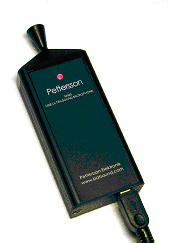
M500 with Directional Horn, and USB cable attached.


After installing The Batsound Touch software on a Windows-based tablet, The M500 proved fun and effective in use.


It produced excellent, clear recordings (and spectrograms) of bats. 

It also possessed excellent sensitivity and pick-up range.


I found that attaching a small foam windscreen (the type designed for lavalier mics) over the mic (both with, and without cone) reduced wind & background noise nicely. Most importantly - I determined that these small foam windscreens did not interfere with the recording of bat vocalizations. They may be found quite easily (and inexpensively) online; from various sources.


I’d experimented with several ways of attaching The M500 to tablets: Including double-sided foam tape, and Velcro (“hook and loop fasteners”) - Which worked quite well.


For those who will be recording bats while on the go, The U256/U384 will likely be better suited. They simply plug-in to a handheld smart device (phone or tablet) and you're ready to move.

Below, is a look at what you get when you open the outer box (directly from Pettersson). 


Unpacking of The U384 Microphone from Pettersson: 


The U384 USB Microphone with included accessories


If your device doesn’t have a USB Micro B jack, a simple/inexpensive adapter will get you operational.


BatSound software from Pettersson Elektronik (being installed).
 
Once again (as in years past) I’ve found BatSound to be a wonderful, sound analysis application. Producing Professional results. I have much more to learn about it...
Many Professionals around the world who work with bats, are quite fond of this piece of software. Further evidence of this can easily be seen whenever you pick up a book dealing with bat bioacoustics. See this book as just one an example.


The U384 USB Microphone’s Bat Recordings on BatSound


The U384 USB Microphone from Pettersson 

The U384 has a built-in cone as part of it’s design. (Photo from Pettersson Elektronik)


U384 - 43 x 35 x 13 mm (including microphone horn) 

Weight - 25 Grams. List price for The U384 Mic (directly from Pettersson) is £259 GBP. From NHBS (in UK) £299.17 


It is constructed of Aluminum with a flat black finish: Lightweight and sturdy. 


What exactly is The U384 USB Microphone? 
  • It is also an advanced, ultrasonic microphone, designed to record ultrasounds directly to the device it is attached to.
(in the case of The U384: This may be a tablet or smartphone)
  • It covers 1 kHz - 192 kHz, records in 384 kHz/16 bit format, and features an Anti-aliasing filter.

I have tested The U384 on: Several types and brands of tablets with zero issues.

I like the fact that it’s frequency range begins at 1 kHz (rather than 10 kHz) which allows me to record all kinds of interesting creatures! (mainly, singing insects).


I've found this USB microphone a joy to use - It’s sensitive, and produces very clean/accurate spectrograms (regardless of the software you use to analyse your recordings).  


So, what's it like to use The U384 Microphone?


Well, it is smaller & lighter than The M500; and transforms your device into a very capable bat detector in an instant. 

The U384 Mic is very easy to use! Plug the module into your device’s USB port, launch the App (of your choice), and you are monitoring/recording bats. 


The U384 requires less current than The M500 units, which translates to longer battery life / operation in the field. The U384 uses a MEMS microphone element; as opposed to the electret type used on The M500 Mics. 


This provides higher sensitivity, and a lower overall noise level. I’ve experienced this firsthand: In use, The U384 is remarkably quiet (the same goes for The U256 USB Mic). BatSound software is a very capable analysis platform. 


Happy bat detecting!

Tuesday, September 21, 2021

From Pettersson Elektronik - The USB Ultrasonic Microphones - M500 & U384

"We shall not cease from exploration, and the end of all our exploring will be to arrive where we started and know the place for the first time."
-T.S. Eliot
 
Coming up next here on the blog, will be:
A (second) look at The M500 bat detector from Pettersson - Full review.
And- A full, detailed review of The U384 bat detector. Both are USB-based ultrasonic units, which have been well received by bat professionals around the world.
 
In addition to the useful bits of kit which Wildlife & Countryside Services carries: See Here - They also have both of these Pettersson units in stock (as well as many others).
They provide exclusive extended warranties as well.
 
The M500 USB Microphone from Pettersson - A closer look... 
 
 
-- As well as --

The U384 USB Microphone - A full review.


Until then...
 
Happy bat detecting!

Friday, August 20, 2021

Review: The Song Meter Micro Recorder from Wildlife Acoustics Part 2 Of 2

Review of The Song Meter Micro Recorder from Wildlife Acoustics Part 2 Of 2

The Song Meter Micro is an unattended recording unit. It's so small and light, that I frequently put it in my pants pocket, before climbing up some steep terrain to deploy it. And, there have been several times (lately) when I've been very thankful for this ability.
 
In this instance, The SM Micro was placed just behind the small tree stump to the left of center in this pic.

The location for The Song Meter Micro (in pic above) was chosen, because a small animal was captured on trail cam video in that vicinity. Viewing the snapshot above, one might think it'd be easy to get to that tree stump...what isn't obvious however, is the very steep climb involved!

In general, it's easy to set-up and deploy. Whenever possible, I try to anchor it to a tree (using a small/short screw) -or- fasten/tether it to a branch, tree trunk, etc. I do this, to prevent the (unlikely) event of an animal walking off with it. Just in case some animal decides it would make a good chew toy?
As a side note: A Coyote were heard (close by) just last night (8/18/2021). A Great Horned Owl was heard today, it sounded like it was only about 40 meters away! 


The Song Meter Micro would be a great choice for Ecologists needing a programmable, unattended wildlife recording solution. The Micro is capable of recording vocalizations from a wide range of species. As mentioned in Part 1 of this review, the sample rate may be changed, to better suit the target species. Admittedly, I've failed to do this myself in the past. For no other reason than being hasty and too anxious to get it set-up before nightfall. Also, from years of using portable digital recorders for wildlife recording: I got into a habit, of always setting the Kbps to whatever the highest setting available was...
(wildlife sound recordists will relate)

Last weekend, right after moving into my new (rental) home, I found myself without a recording bat detector handy. I tend to always keep a Batseeker 4 around; but having a non-recording (FD) detector available just wasn't cutting it. I had a simple digital recorder, but couldn't locate an audio cable (everything was still in boxes).
It was a case of the glass being half empty (to me). In fact, it was quite a bit worse than just the glass just being half empty. Taking some time to observe and detect bats, at my new place, without the ability to ID and/or record bat calls was frustrating! Not fun for any experienced bat detecting enthusiast!
 
There I was, in a proverbial "pinch" - Wanting to record and * ID the species of bats, which were flying so neatly, high above me... And all I had to hand, was an entry-level, frequency division detector. There wasn't even a heterodyne unit around; where I could've at least ID'd a few "by ear". 
At least then, I could've gone to bed with a sense of accomplishment - Perhaps after having written some acceptable notes in my nature journal...But it was not to be; not that night.
This is not to say that there is anything "wrong" or lacking with the inexpensive Batseeker 4. On the contrary, it's still the least expensive way for someone to try bat detecting first hand. But, it is an entry level bat detector designed for beginners. 

The following evening, I decided to utilize The Song Meter Micro for a full evening's worth of unattended bat recording...I was keen on figuring out exactly what the predominate species of bats were here.

I set-up the Micro's settings as follows:
 
Sample Rate: 96000
Maximum Recording Length:  10 Minutes
Gain: 6
Delay Start:  off
 
Start Time: Set (Sunset) 00:00
Time Duty Cycle: Always
End time: Rise (Sunrise) - 01:00
These settings worked well for my purposes. Let's not forget that The Song Meter Micro was designed to record non-bat species...
And I've also used the built-in 'Record birds/frogs 24 hours a day' setting, with good results as well.

And while utilizing the latest version of Kaleidoscope Pro software, I was able to get some decent results (when compared to having a dedicated [designed for] bat detector). 
 
The Silver-Haired Bat (Lasionycteris noctivagans)
appears to be the most abundant species here.
 
 
Silver-Haired Bat (Lasionycteris noctivagans)
 

Silver-Haired Bat (Lasionycteris noctivagans)

One of the things I really enjoy about The Micro, is the ability to use Bluetooth to check it's status. Now first I will point out the typical maximum distance of Bluetooth, when considering smart phones & tablets - The general consensus is 10 meters (30 feet). If I remember correctly, back when Bluetooth was first announced, it was 15 feet?
If you're interested in the official (specification) for Bluetooth communication between (various) devices; and under various circumstances - You're free to become engrossed with this page, from Bluetooth itself. Note: The short video provides an amusing summary!
But, I digress...
 
The gist of it is, that I find it fun to connect to the deployed Song Meter Micro via Bluetooth, to check it's status. Especially, if the unit it set-up in the back garden, and I can check it while comfortably in bed:
 
General status of Song Meter Micro via Bluetooth
(using Lenovo tablet)

As seen from the screenshot above, the data provided are the most essential factors. The 2 which I typically look at, are: (number of) Recordings, and Battery Level. I'm also happy to report that I've typically been able to communicate with The Micro from distances well on the plus side of 10 meters.
It's interesting to see it connect, while the distances between are not line of sight, through house walls, at odd angles, etc.

The Song Meter Micro Configuration screen

Personally, the species I've been hoping to record are Shrews; (Blarina Spp.) Short-Tailed Shrew, specifically. None confirmed yet, but I've recorded plenty of interesting species in the process. The Micro is well suited for recording many different species, and will be popular with Ecologists in the field.
 
To summarize, and point out additional features:
 
The Configurator App (on your smart phone or tablet) conveniently shows the recording space available on your installed SD card; and your battery status.

The User Manual states that mounting methods include bungie cords, zip ties, or cable locks - I agree; I've found zip ties of various sizes to be useful.

Inside The Song Meter Micro - Note: Always use good quality / good name brand batteries (not like the ones installed above)

 
As mentioned in my video review, on The BatAbility Club's Site:
I originally had issues when syncing the time/time zone, using my Lenovo tablet. I did not encounter the issue when testing/using The Micro with other smart phones & tablets.

The Preset 'Record birds/frogs from sunrise to sunset' is perfect for recording birds.

Remember to tap the 'Load' icon, to display a list of saved configuration files, while in the Configurator App. 
Tap the 'Save' icon to name and save the current configuration/settings to the Configuration Library.
To save new changes to the Configuration Library, tap the Save icon again.

The microphone has a Test Microphone feature. It allows you to check the status of the Mic's sensitivity; as well as calibrate it (with a third-party calibrator).

Choose a sample rate that is at least double the highest frequency to be recorded.
 
Utilizing a silica gel packet (inside the unit) when deploying, is an excellent tip from Wildlife Acoustics.
 

Again, The Song Meter Micro was made was designed to record vocalizations of non-bat species. So far, I've made very good recordings of: Fowler's Toads, Wood Ducks, various songbirds, various singing insects, Great Horned Owl, Coyote, and in a pinch: Bats.


I think my Nephew Gabe approves!


Next-up: USB based bat detectors from Pettersson! The M500 and U384 Microphones - Video presentation review on The BatAbility Club
If you haven't already, you should consider becoming a Member - Neil Middleton has interviewed almost everyone who is anyone in the world of Bats!
Including extensive interviews with Lars Pettersson, David King, and none other than Merlin Tuttle!! And many, many more...

Until then, Happy bat animal detecting!

Wednesday, July 28, 2021

Review: The Song Meter Micro Recorder from Wildlife Acoustics Part 1 Of 2

Part 1 Of 2 The Song Meter Micro Recorder from Wildlife Acoustics

The Song Meter Micro, is the latest offering in the line of Wildlife Audio Recorders from Wildlife Acoustics, in Massachusetts USA.

This (very small!) wildlife sound recorder, was developed for those needing to record various (non-bat) animal species.

This compact, cute, and robust sound recorder was designed from "the ground up" to work as an unattended recording solution. The main points one realizes straight away are:

It's small!

It's not very expensive.

It's robust & capable.

Packaging - Upon arrival, you'll notice that the box is small. When you open the (outer) box, you'll notice that the inner box is small...

Unboxing video on YouTube 

The unit is 4"/101mm High x 2.9"/74mm Wide x 1.1"/28mm Deep. It is 0.43lbs/195g with batteries installed.

The Song Meter Micro currently sells for $249 (US dollars) directly from the Wildlife Acoustics Site. It is also available from many Dealers in the UK and Europe. 


For those in The UK, NHBS has them in stock. The Song Meter Micro is designed for unattended recording of wildlife sounds in the field. It is constructed of a dark green poly-carbonate, which blends into the natural environment very well. It comes with a built-in, omnidirectional microphone. The Song Meter Micro records 16-bit PCM .wav files - to a single, Micro SD card (up to 2 terabytes in size). 


The sample rates available, range from 8kHz to 96kHz. 8, 12, 16, 22.5, 24, 32, 44.1, 48, and 96kHz are the selections available. Run time on 3 AA-sized alkaline batteries, is 150 hours. Wildlife Acoustics provides a thorough, 15-step Quick Set-Up Guide. 

For a whittled-down version, just to give you an idea of what's involved:

  •  Download/install the free App onto your mobile device.

  •  Get The Song Meter Micro up & running, by installing batteries, Micro SD card, and powering on.

  •  Choose from one of the pre-set schedules provided; save.

  •  Load schedule to The Micro via Bluetooth, replace cover, and deploy unit.


The Song Meter Micro deployed near my local lake. One small screw was all that was needed, to attach it to a tree at the water's edge. My target species here, were small terrestrial mammals (especially Shrews). More specifically, I was hoping to record Northern Short-Tailed Shrew (Blarina brevicauda); which I know to are in the area. No luck yet...at the time of this writing.

Once you read through The Quick Start's 15-Step process, and deploy the unit a few times, it becomes very easy. Read the User Manual, and you'll understand a lot more about how it may be customized: Gain settings, etc.

This unit fills a need for many Researchers working with (non-bat) animals that vocalize.


The unit records sounds very well; about as good as a handheld digital recorder in the same price range. So far, I've recorded various songbirds, ducks, singing insects, and Fowler's Toads.

Part 2 of this review will feature sound recordings (via YouTube video links), as well as spectrograms (using Kaleidoscope, of course!).

When deploying Song Meter Micro's, I would follow this excellent tip, directly from The Wildlife Acoustics's web page: "requires adding desiccant for each deployment to prevent condensation."

Pros:

  •  Relatively inexpensive for what you get (good value).
  •  Made by a trusted name in wildlife recording equipment.
  •  Professional Tech support available.

Cons:

  • Mobile device is necessary to control/set-up, and check status.

Once again, The Song Meter Micro may be ordered directly from Wildlife Acoustics, if you're in The U.S. 

Links to excellent Song Meter Micro Vimeo videos (created by Wildlife Acoustics):

Song Meter Micro Configuration Editor

Song Meter Micro Configuration Library 

Learn more about The Song Meter Micro in Part 2 of 2, of this review. 

...Unless, you're the "impatient type" and want to know more about The Song Meter Micro right now - In which case, I'd recommend signing up to The BatAbility Club: Where there's a full webinar (video review) & discussion about it - By yours truly! Along with comments and questions from Director, Neil Middleton.

Happy bat animal detecting!

Wednesday, July 21, 2021

A DIY Ultrasonic Microphone For The AnaBat Walkabout

A DIY Ultrasonic Microphone For The AnaBat Walkabout from Titley

Below, I describe some details of my experiences:

I've tried making some DIY-type ultrasonic Mics, to plug into The Walkabout's 2.5mm microphone jack... However, there are a few reasons why I wasn't successful. Without going into a bunch of (unnecessary) technical details, suffice it to say that The Walkabout's Mic jack is a bit too advanced to "suffer the foolishness" of my amateur attempts!

The Walkabout's jack provides approx. 6.4 v DC - Not suitable for most DIY Mic capsules, etc. This equated to more tinkering.

Here is just one (of several!) examples, of a (home-built) ultrasonic microphone; which I wired to a (male) 2.5mm plug, for testing with The Walkabout.


The photos below, show a quick wiring-up, for testing. A DIY Mic utilizing the Panasonic WM-61A Mic capsule.


Quick wiring-up
Panasonic WM-61A


Here is another Mic, which I initially thought would be perfect for The Walkabout. It is an adorable little circuit board (complete with Mic capsule already attached).


Prior to attaching Arduino-type pins
AA battery shown for scale


These are available from FEL Communications Ltd. (in UK).


In order to get the output voltage of The Walkabout's (2.5mm) jack, to a safe and usable level for the Micbooster Mic board: 

I found that a 180K Ohm resistor (on the [+] voltage wire) reduced the voltage from 6.4v to 4.6v - Which is acceptable for the Micbooster ultrasonic board (voltage must be kept below 5v when working with this board).
However, I still had no success in recording any bats through it (attached to The Walkabout). All of my early attempts/tests, with DIY microphones, were unsuccessful.
It was fun trying though. And I was thankful that The Walkabout gives one the opportunity to experiment with such external microphones.


Experiments involving The AnaBat Walkabout have ceased. There is a limit to how much (careful) experimenting I'm wiling to do on a high-end bat detector. Especially one generously loaned to me for testing and review.

I eventually came to the conclusion, that it would be best for someone to just purchase the official Titley microphone adapter and Mic, if there is a need.


In my case, while spending a lot of time trying to build a working Mic:
It only served to bolster my appreciation of the quality recordings captured with The Walkabout's built-in (Knowles) microphone. 


But, experiments with this cute little (Micbooster) Mic board continue...
Recent tests, involving the ultrasonic mic board and regular digital recorders seem promising.

Happy bat detecting!

Saturday, July 17, 2021

Some random thoughts on Non-Bat Recorders

As many of you may know, I've been testing and using The Song Meter Micro from Wildlife Acoustics, and I'm impressed. 


The Song Meter Micro
 

Of course, as a result, I've become very keen on non-bat sound recording! Amphibians, and singing insects (esp singing insects) had always been a seasonal interest/hobby of mine. And I'd become so accustomed to recording our Spring Peepers each year, that it was all but an automatic reflex.

But as we all know, way-leads-to-way when you're a naturalist: So now, I've become fascinated with rodents and small mammals in their woodland environments:

Voles (some happen to be pretty cute), Moles (very secretive), and especially Shrews! one of my (confirmed) local species of Shrew, is the Northern Short-Tailed Shrew (Blarina brevicauda)Hard to deny that it is one fascinating creature!

I'm fortunate enough, to have a good chance of picking up vocalizations of: Fox, Coyote, and others. 

I also remain hopeful, against the odds - that I'll capture vocalizations of a Fisher and River Otter.

Well, there's more interesting tidbits of information, which I'll be adding to this post soon... Including some fascinating projects which Neil Middleton (of The BatAbility Club) and others, are going to be working on: Terrestrial Mammals!

Until then,

Happy bat mammal detecting! ;)

Friday, June 18, 2021

The Song Meter Micro from Wildlife Acoustics - First Look!

I am very happy to report, that The Song Meter Micro from Wildlife Acoustics has arrived for testing and review. So far, I'm very impressed with it.


I couldn't help but make a quick unpacking video.  


Let me remind the reader, that this device was designed to record wildlife other than bats. Wildlife Acoustics has it listed as a bird and wildlife recorder (as can be seen from the above link).

This micro-sized unattended recording solution, is already being used successfully in the field - To record singing insects, amphibians, mammals, and birds. It has many customizable features (especially for such a small device).

I simply couldn't resist some preliminary tests with The SM Micro. I've also taken the time to review many of the recordings, made here in the suburbs...And straight away, I can tell this unit has a lot of potential! 

I've just recently started to hear singing insects in the evenings. The local population of mammals are pretty much always present. And my local toad and frog population should be making their debut any night now!

Happy bat detecting!

And happy wildlife sound recording! - Visit The Wildlife Sound Recording Society

Review Of The LunaBat DFR-1 Pro Bat Detector Part 2 of 2

Review of The LunaBat DFR-1 Pro From Animal Sound Labs Part 2 of 2 
 
I expect Readers to find much of the User Manual to contain rather interesting bits of information. Some additional pages of interest from the User Manual include:
 
3.11 Correction of the recording level (Rec Level) AKA: (Changing the recording level [Set Rec Level]). Page 16
4. Detector firmware update (Firmware Update). Page 17
5. Useful tips. Page 19
6. Approximate working times in different conditions.* Page 20
 
*Of particular interest, if you're a battery geek (like me) - Two excellent brands of batteries are mentioned as well.

The LunaBat DFR-1 Pro is a good product for those in need of a handheld, professional-level bat recorder; which may also be used as an unattended detector, in many instances. It is robustly built, and can be relied upon to record bats in almost any situation or environment.
 
I've been informed that the very latest version of this detector, has had the buttons modified to respond to less pressure, and the amount of button travel has been reduced.
The illumination of the LEDs has also been made more energy efficient. 
 
As mentioned in Part 1 of this (2-part) review, the unit is highly customizable. Amoung the features are:
  • High-pass and low-pass filters
  • Full spectrum  High Pass filters
  • Frequency division high pass filters


As indicated in the user manual when the full spectrum high pass filter is turned on, certain audible sounds will not be recorded, such as those produced at frequencies below 15 kilohertz. Things like conversations, walking on dry grass and / or leaves, and other undesirable sounds.

Use of this filter is recommended during recording attempts in strong winds, or when one is in fact walking on dry leaves, dry grass, etc.

With the full spectrum high pass filter enabled, the lower-frequency limit of recorded signals will be approximately 150 Hertz, which enables things like verbal comments, other voices, and other  normally audible sounds. 

During my Summer of testing, I rarely came across a situation in which I needed to enable it. When using even the default settings, there weren't many instances where sounds other than bats triggered the LunaBat. I would just hit 'OK' to record, and walk...

If you have dry leaves underfoot during your survey, bat-walk, etc., then in addition to the filter, you can adjust the trigger level. Regardless of the mode I used, no background hiss was heard from this detector. 

All of this is covered in more detail in part 3.9 (page 15) of the user manual.

 
It has demonstrated excellent sensitivity. As you will see, when I add some results below, in the form of sonograms, and recordings. ...Thank you for your patience...

Now, although Animal Sound Labs graciously provided a list of links to free sound analysis software - On their Download page (under the heading 'Programs').
I decided to go ahead and utilize the latest version of Kaleidoscope (Version 5.4.2) from Wildlife Acoustics.
Especially since an update post on this excellent bat call auto-ID software is on my agenda.
 
Eptesicus Fuscus (Big Brown Bat)
as seen with WA's Kaleidoscope Pro software.
 

Lasionycteris Noctivagans (Silver-haired bat

Other neat features worth mentioning are:
 
A standard (3.5mm) audio cable may be used to connect the detector to a cell phone (w/ Mic Input) - Allowing Apps such as SpectralProAnalyzer to display live spectrograms. You may also experiment with similar, spectrogram-producing Apps.
 
Once the GPS/GNSS (blue) indicator comes on, maximum signal strength (exposure to the open sky) is no longer needed.
 
The volume setting is remembered after the unit is powered off; and even during battery replacement (if completed in under ~1 minute).
The length of each individual recording may be set to anywhere from 3 seconds to 60 minutes. 
 
As always, I encourage readers to do their research, and shop around. Again, watch this space for soon-to-be-posted spectrogams!
To be continued...

Happy bag detecting!

Looking for The Next Bat Detector for Review!

Well… For now, I’d just like to say Thank You to The Netherlands! 🇳🇱  There will be 2 new bat detectors tested and reviewed here in the ne...