Showing posts with label wildlife acoustics. Show all posts

Thursday, February 2, 2023

The Song Meter Micro - From Wildlife Acoustics - Another Quick Look

The Song Meter Micro Revisited

A good, inexpensive, static recorder for recording Winter wildlife.

So, in addition to taking this Winter/down time to analyse all the bat recordings we've accumulated, what else are we doing?

Well, if you're like me, you also don't want to miss any neat wildlife sounds still occurring during the cold weather; but how?

Unattended sound recorders like The Micro, are a big help in such situations. Primarily, because of their customizable features. 

First we must consider a couple of factors... Such as where you live, and whether or not you have access to areas where wildlife vocalize. As for urban wildlife sound hobbyists - I have not forgotten you! Nor, have I forgotten how difficult it can be, to capture clean recordings of animal sounds. It's not easy while living in/or close to a city - but it certainly can be done!

In my particular situation, at the start of this Winter, I've had occasions when I could hear coyotes (and sometimes foxes) vocalizing at night. By my estimation, I would say their location was at least 100 meters away. 

I immediately started thinking: how am I going to capture these sounds? I'll run down the thought processes I went through:

  • Get a shotgun microphone?
  • An inexpensive (affordable) field recorder using it's built-in (X-Y) microphones?
  • Maybe a good field recorder with a shotgun?
  • Possibly a good-quality trail cam?

Enter The Micro!

Yes, there are other options out there as well...but we won't be discussing them at this time.

Note: The Song Meter Micro's Quick Start is located right at the beginning of the User Manual.  

I have written a full review of The Song Meter Micro, which may be read Here. Perhaps of even greater interest: There is also a full, webinar/presentation review of this unit; viewable to Members of The BatAbility Club.

Also note:
  • The Micro allows a wide range of recording schedules/flexibility. 
  • Wildlife Acoustics has excellent Customer Service & online resources available.
  • Wildlife Acoustics provides a handful of silica gel packs with the unit.

The next review (coming soon) will be of the recently released book 'A Miscellany Of Bats'

Followed by a review of The TeensyBat (Ver. 4.1) DIY bat detector. Webinar/presentation review is already up and available to members of The BatAbility Club.

Until then,
Happy sound recording!

Friday, August 12, 2022

Review: The Newest Echo Meter Touch 2 (Non-Pro Version) From Wildlife Acoustics

From Wildlife Acoustics 

So, here's a bat detector which needs no introduction... The Echo Meter Touch 2

Stock photo from Wildlife Acoustics website.


This is how the unit arrives, double-packed, directly from Wildlife Acoustics.


Very well protected inside the cardboard box

The Echo Meter Touch App, is what you download for free, from the Google Play site online - In order to operate the unit on your cell phone. All units manufactured after 2021, will have a USB—C connector.
It's important to keep in mind that a USB—C to Micro—USB, or Micro-USB to USB-C adapter may also be used...These are inexpensive, and readily available. Any adapter used, should conform to the On The Go specification.

The Echo Meter Touch 2 is very small and light, some would say amazingly so!
One of the reasons why I mention this specifically, is because it seems to me, to be even lighter than any of it's predecessors.
At the time of this writing, it is selling for $179 US dollars — directly from the Wildlife Acoustics website.


The echo meter touch 2 in it's protective carry pouch
(very neat!)

You will find that the echo meter touch 2 is very reasonably priced, and available from many different sellers — online. Including NHBS in the British isles; and Wildlife & Countryside Services.

It doesn't take very much practice before becoming comfortable using the echo meter touch app. You are able to easily toggle between compressed and expanded mode, using the icon on the main monitoring screen.

Remember to configure your Auto ID mode. Enter the Auto ID mode: and select from North America, Europe, United Kingdom, Neo Tropics, and a South African region (should be available in the latest version by the time you're reading this).

There is also a small manual record button — Red, and marked with an M. — which you can use to initiate a recording..... This button may be used on its own — or while triggered recording is in session... This is helpful in case the trigger misses something. You may read more about this in section 2.5 of the User Manual.
As always, I recommend reading the the freely downloadable User Manual — preferably in it's entirety!

You also have the ability to stop the recording label icon to open the notes page. Voice and text notes are saved as metadata in the recording, and they are transferred along with the recording to your PC. You can later use the search feature, to search the text of any text notes you had may have added.

The app has a limit of 10,000 recordings— after that, recordings will need to be transferred or deleted.
Another interesting feature is that in live mode, heterodyne can be tuned automatically or manually.

In GPS view: you can see the different locations, since each recording session is shown with a different path colour.... The KML file is generated and stored with the session, in the session folder.

I'm glad that you are able to adjust The Real Time Expansion on a previously made recording. 
In order to adjust pitch (1/10 is higher pitched [and the one I prefer] and 1/20 is lower pitched).

The nightly sessions mode is very neat, and behaves as a sort of unattended recording mode. Nice.


There are several methods of transferring your recordings onto a computer. You may use WiFi, a USB cable, or email. I experimented with all of them.

Part 5.2 of the user manual discusses audio specifications, of both the EM2 and the EM2 pro. Very informative, as you would expect.

You can also have a look at this page, on the Wildlife Acoustics site; which shows a neat side-by-side comparison - between The EM Touch 2 and The EM Touch 2 Pro.

The Echo Meter Touch 2 is very easy to use; and would be ideal for a beginner, or just about anyone interested in listening to, and/or recording bat calls.
And as always, I recommend the EM Touch 2 Pro to those who prefer better performance and features.

You can use The EM Touch 2 to save triggered recordings to .wav files. You may listen to the recordings, in either RTE (Real Time Expansion), HET (heterodyne), or traditional Time Expansion. In other words, while recording —Or while listening to the recorded files on your phone.

You can use the Touch, to transfer recordings to your computer. The app bundles the recordings into a zip folder, and allows downloading by entering a short URL into any web browser.
The screenshot below, shows the spectrogram of Lasionycteris noctivagans, a species of Vesper bat, here in The Northeastern United States:


A recording of a Silver-Haired Bat, made with The EM Touch 2
Viewed using Kaleidoscope, and Zoomed-in on a bit.


Pros:

* Price: Reasonably affordable, considering what you get (providing that you already have an Android cell phone).

* Easy to use, with a lot of features - not the least of which is Auto ID.

* Lightweight and robust.


Cons:

* Speed and responsiveness are directly related to the speed and responsiveness of your cell phone (new, fast phone = fast bat detector).

* Audio output isn't very loud. On the late model Samsung cell phone I used, I found myself wishing it was much louder.

So, the other minor Con, would be that it's no longer manufactured for use on any Apple devices.

Note: When rushing out to detect bats using the default settings (presuming you're recording bats in rainy conditions - from a dry refuge!): You will hear light rain / raindrops being registered. 
This may be remedied by making adjustments in the frequency response parameters - Basically the "window" of frequencies you allow the unit to record - An incentive to become familiar with the customization's The Touch is capable of; as well as The User Manual in general.
Which all serves to help you get the most out of The Echo Meter Touch 2.

This pretty much sums up The echo meter touch 2 (non pro edition). I plan to add some more info to this review in the near future; along with some recordings, et cetera.

Thank you to Wildlife Acoustics for providing the unit for review! The EM Touch 2 has been sent to The BatAbility Club (in Scotland) - Where it will be featured in an upcoming free giveaway—For BatAbility Club members!

Until next time, Happy bat detecting!


Wednesday, July 28, 2021

Review: The Song Meter Micro Recorder from Wildlife Acoustics Part 1 Of 2

Part 1 Of 2 The Song Meter Micro Recorder from Wildlife Acoustics

The Song Meter Micro, is the latest offering in the line of Wildlife Audio Recorders from Wildlife Acoustics, in Massachusetts USA.

This (very small!) wildlife sound recorder, was developed for those needing to record various (non-bat) animal species.

This compact, cute, and robust sound recorder was designed from "the ground up" to work as an unattended recording solution. The main points one realizes straight away are:

It's small!

It's not very expensive.

It's robust & capable.

Packaging - Upon arrival, you'll notice that the box is small. When you open the (outer) box, you'll notice that the inner box is small...

Unboxing video on YouTube 

The unit is 4"/101mm High x 2.9"/74mm Wide x 1.1"/28mm Deep. It is 0.43lbs/195g with batteries installed.

The Song Meter Micro currently sells for $249 (US dollars) directly from the Wildlife Acoustics Site. It is also available from many Dealers in the UK and Europe. 


For those in The UK, NHBS has them in stock. The Song Meter Micro is designed for unattended recording of wildlife sounds in the field. It is constructed of a dark green poly-carbonate, which blends into the natural environment very well. It comes with a built-in, omnidirectional microphone. The Song Meter Micro records 16-bit PCM .wav files - to a single, Micro SD card (up to 2 terabytes in size). 


The sample rates available, range from 8kHz to 96kHz. 8, 12, 16, 22.5, 24, 32, 44.1, 48, and 96kHz are the selections available. Run time on 3 AA-sized alkaline batteries, is 150 hours. Wildlife Acoustics provides a thorough, 15-step Quick Set-Up Guide. 

For a whittled-down version, just to give you an idea of what's involved:

  •  Download/install the free App onto your mobile device.

  •  Get The Song Meter Micro up & running, by installing batteries, Micro SD card, and powering on.

  •  Choose from one of the pre-set schedules provided; save.

  •  Load schedule to The Micro via Bluetooth, replace cover, and deploy unit.


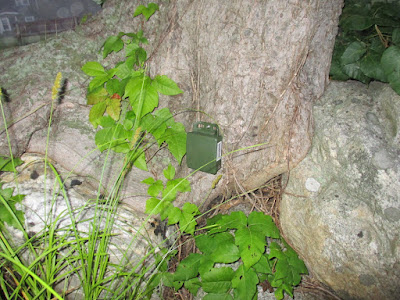
The Song Meter Micro deployed near my local lake. One small screw was all that was needed, to attach it to a tree at the water's edge. My target species here, were small terrestrial mammals (especially Shrews). More specifically, I was hoping to record Northern Short-Tailed Shrew (Blarina brevicauda); which I know to are in the area. No luck yet...at the time of this writing.

Once you read through The Quick Start's 15-Step process, and deploy the unit a few times, it becomes very easy. Read the User Manual, and you'll understand a lot more about how it may be customized: Gain settings, etc.

This unit fills a need for many Researchers working with (non-bat) animals that vocalize.


The unit records sounds very well; about as good as a handheld digital recorder in the same price range. So far, I've recorded various songbirds, ducks, singing insects, and Fowler's Toads.

Part 2 of this review will feature sound recordings (via YouTube video links), as well as spectrograms (using Kaleidoscope, of course!).

When deploying Song Meter Micro's, I would follow this excellent tip, directly from The Wildlife Acoustics's web page: "requires adding desiccant for each deployment to prevent condensation."

Pros:

  •  Relatively inexpensive for what you get (good value).
  •  Made by a trusted name in wildlife recording equipment.
  •  Professional Tech support available.

Cons:

  • Mobile device is necessary to control/set-up, and check status.

Once again, The Song Meter Micro may be ordered directly from Wildlife Acoustics, if you're in The U.S. 

Links to excellent Song Meter Micro Vimeo videos (created by Wildlife Acoustics):

Song Meter Micro Configuration Editor

Song Meter Micro Configuration Library 

Learn more about The Song Meter Micro in Part 2 of 2, of this review. 

...Unless, you're the "impatient type" and want to know more about The Song Meter Micro right now - In which case, I'd recommend signing up to The BatAbility Club: Where there's a full webinar (video review) & discussion about it - By yours truly! Along with comments and questions from Director, Neil Middleton.

Happy bat animal detecting!

Sunday, January 28, 2018

Review of The SongMeter SM4BAT FS from Wildlife Acoustics

Review of The SM4BAT FS SongMeter from Wildlife Acoustics

Note: This review will be updated further, over the next few weeks (with extra details, spectrograms, etc.)

The SM4BAT is the latest SongMeter system, available in both full-spectrum and zero-crossing models, from Wildlife Acoustics. It is a ultrasonic bat recorder, designed to be used as a passive/unattended recording solution.

It's a single channel recording system, which is both lightweight and compact. And has the ability to be left unattended, for long periods of time (up to 45 days!).

A very concise overview of this new unit, may be seen on the manufacturer's page Here.

The SM4BAT arrives double-boxed and very well packaged. In other words, the product box is protected by air-filled cushions (as well as bubble wrap).


The unit's dimensions are as follows:

Height: 8.6" (218 mm)  Width: 6.0" (152 mm)  Depth: 3.1" (78 mm)
1.6 lbs / .7 kg without batteries, 2.9 lbs / 1.3 kg with batteries


I can also state, that no less than 9 of them will fit into an ordinary backpack.

As per Wildlife Acoustics' Web site:

"The new, low-power microprocessor, combined with 4 D-size batteries, enable the longest deployment times of any other bat recorder available. The SM4BAT FS has a recording run time of 250 to 450 hours (e.g. 25-45 10-hour nights) depending on bat activity and other factors."

There are several features which make this bat detecting system desirable:

  • It's particularly well-suited for those in need of unattended monitoring/recording of ultrasounds; especially bat activity. 
  • It is capable of recording an unprecedented number of bat passes - up to 45 nights! directly across multiple (up to 2) SD cards. 
  • It's very easy to use, and no PC is needed for the set-up, or actual recording.
The new SMM-U2 microphone's low noise and superior sensitivity, makes it an excellent addition to this Song Meter system. More on this Mic later...

The Song Meter SM4BAT is designed using very heavy-duty poly-carbonate, which is impervious to extreme weather conditions. It was definitely designed with the needs of Ecologists in mind.


As with it's predecessors (earlier Song Meter systems) it is very easy to set-up and use.


The SM4BAT FS may be purchased directly from The Wildlife Acoustics page Here.


As always, the Customer Service/Support aspect of Wildlife Acoustics: In a nutshell, their Technical Support is second to none.


This new SM4BAT FS has proven to be excellent for my nightly recordings.


Another neat attribute of the SM4BAT I like, is how the microphone units are protected.  Using a well-secured, dark gray foam. In the printed materials provided, Wildlife Acoustics explains just how waterproof their SM4BAT platforms are. As in the past, they also provide tips and best practices for outdoor deployment. 

The Song Meter SM4BAT has been designed with great pick-up range. There is a PCB mounted, 3.5mm earphone jack located inside the SM4BAT's enclosure. This is provided so that one can listen to the sound input while recording; this may be used for live monitoring, to check the status of microphone(s), perform test recordings, etc.

No tools are required to open the unit.
With the top cover snapped back on, in preparation for mounting/deployment - The green LED light will be visible to you, via a built-in diffuser. So that you can get feedback before, during, and after the unit is mounted:
- A steady, repeated blinking: Indicates the unit has started it's scheduled recording. This informs you that the system is awake, and is actively monitoring.


The installation and configuration of the SM4BAT is a very easy process.
Just install batteries - 4 D cells (Energizer brand recommended), a Class 4 SD memory card, and you're more than halfway done.  


Some of the other main features are: The LCD display - Which is easy to read, and will help you set all device options.
Among the main things you might want to do are:
- Set the Record Start and Stop times, set the internal clock.
- Adjust Sensitivity values which you can use to fine-tune the level for the triggering.
There are a few other things, which you will learn all about from the User Guide; which happens to be one of the best I've ever seen.

It has been a pleasure to use. And thanks to Wildlife Acoustics' Kaleidoscope software: The analysis of bat recordings has been a breeze ever since! I've got lots of recorded bat calls to listen to, and create various sonograms with.


The SM4BAT happens to be the approximate size of other comparable unattended recording solutions. In fact, it is a bit smaller than some. It is easily portable, fitting one (along with accessories, etc.) into a backpack is effortless. Without batteries installed, the unit is very light. 
As previously stated - The fact is, you can fit 9 of these units in a typical backpack (with room to spare).

Sensitivity and filtering are fully adjustable, across the spectrum of the unit's abilities.


The fact that the unit can be used as a "Set-and-forget" recorder (for up to 45 days) is a plus.
The unit is very economical; especially when compared to similar systems which are currently available.

The Kaleidoscope software, from Wildlife Acoustics is very versatile; and produces nice-looking (and informative) sonograms.

With the great help/suggestions and support I received from the Folks at Wildlife Acoustics, I ended up with a diverse collection of recordings. The nice thing about it, is that I was able to test a lot of different variations of settings. In a short period of time.  


You can basically go either way, in your approach to the use of this system: You may choose to rely mostly on the default settings - And take a more simple approach (which is exactly what I did in the beginning of the test period). Or, you may be the type who enjoys tinkering & experimenting. In which case, you'll find a fair number of combinations, for customizing preferences.


Happy bat detecting!

Friday, May 16, 2014

Review: The New Echo Meter Touch From Wildlife Acoustics - Part 2 Of 2

Review: The Brand-New EM Touch From Wildlife Acoustics - Part 2 of 2

As we've established, in Part 1 of this review, the ideal buyer for The new Echo Meter Touch, would be someone who already owns a compatible Apple iOS device.
This product is also good for someone who prefers a bat detector, which has the ability to constantly improve. This is accomplished, via The EM Touch Software -and- Firmware updates. These will be released regularly, from Wildlife Acoustics.
  
Further good news, is that (as with other iOS Apps) you will be prompted/notified, directly on your Apple device. So, there are no worries about missing or overlooking an e-mailed Newsletter.
The following, are conclusions which I've reached, after using The Echo Meter Touch (with iPad mini Retina) for almost a month now.

So far, I've confirmed The Echo Meter Touch recording bats from a distance of just over 20 Meters. Fairly impressive for a bat detector in this price class. However, I have a feeling that it will be able to pick up bats from even greater distances.Therefore, I will continue to test the EM Touch, to determine the outer limit of it's recording range.
Just a bit more testing, in a different location should corroborate this for me. And of course, any findings, etc., will be published here - In an future (update) post.

The distance at which a bat detector can detect and/or record bats, has always been one of the most important factors (for me). This is the case whenever I evaluate any bat detector. 

The GPS performance is absolutely wonderful! Thanks to the constant access to Google Earth/Maps. I have not seen a GPS system this accurate, since Elekon's Batlogger M. 
Thanks again to Internet access, the live (and recorded) GPS' accuracy seems to be just a hair more precise than even The Batlogger's. For example - When doing some simple bat detecting from within a home: The Batlogger M almost "knew" which room of the house you were in. With The EM Touch, it actually does "know" exactly which room the unit is in.
This observation simply illustrates just how accurate the GPS is. By default, the exact location of The EM Touch+iOS device is represented by a pale blue dot (not shown in photo below). I was pleasantly surprised by it's accuracy. And those performing Transects will be too!

In the photo below, each colored line represents a different recording. Typically, these will be of various bat calls. And will serve to represent the location where each bat was recorded. However (in some cases) there may also be some, from non-biological recordings (man-made noise for example). 
Since the recordings shown below were made from inside a house: The GPS readings tend to get confused. Which, results in the random squiggly lines you see in the image below. This does not occur when using the Echo Meter Touch outside, in the field.


The GPS screen (satellite view) of The Echo Meter Touch. LANO stands for Lasionycteris noctivagans (Silver-Haired Bat).

Pros:
  • Many people already own a compatible iOS device, so the only purchase necessary, is The EM Touch unit itself. 
  • The basic Echo Meter Touch software is free; and very easy to use.
  • It possesses almost all of the most desirable features in a bat detector: The ability to monitor, record, playback, and identify* bats; all via finger-taps on your iOS device. (*with the optional software).  
  • Being coupled to a modern & dynamic iOS device, and being a fully upgradeable bit of hardware itself, are both desirable traits. Both halves of this EM Touch system, are dynamic.
Cons:
  • Cannot charge/plug-in The iPad while the EM Touch is in use - There would be an advantage to this: Whenever the Echo Meter Touch is used from inside a house.
  • The microphone sensitivity cannot be adjusted.
  • The Trigger threshold cannot be modified/set.
*The interesting thing, about the issues in the above list of Cons, is that at least two of them can (and may) be reconciled via firmware updates. Specifically, the Microphone sensitivity adjustment and Trigger threshold setting. Once again, it's hard to ignore the flexibility (and possibilities) of The Echo Meter Touch.

In closing, I'd like to share a quick video I made, demonstrating one of my favorite features of The EM Touch Auto ID software. I highly recommend going for the In-App purchase! You'll be glad you did. In this quick (and spontaneous) video, "shot" in my living room, you can see The Auto ID software analyzing each of the recordings: The blinking yellow bat icon, represents the analysis being performed on each individual recording. 
When the blinking bat goes from blinking to solid - It means that a bat was recorded (and identified!). The standard, date-time format of the recording's name, is appended with the abbreviation of the bat's Species name. Which, in the case of this short video, was 'LABO' (Lasiurus Borealis) - An Eastern Red Bat. I apologize for the poor quality of this video, I hope to replace it with a brighter version soon.


As with several of my recent reviews, I will certainly be revisiting The EM Touch; via future blog posts over the coming months. I promise to help everyone keep abreast of any new developments.

Happy bat detecting!

Wednesday, May 7, 2014

The Echo Meter Touch From Wildlife Acoustics - Addressing Recent Concerns

Review: The Brand-New EM Touch From Wildlife Acoustics - Part 1.5 of 2
An effort to address recent concerns

Since this iOS-based detecting/recording system is so new, and drawing a lot of attention - I felt that perhaps an attempt to address some common questions was in order. In regards to The Echo Meter Touch I'd like to address some of the concerns, which a friend (and Bat Working Professional) has brought to my attention.

Driven transects:

The EM Touch is fine for driven transects, as long as precautions are taken to avoid wind. In any case, this is true when using all bat detectors. I've performed my amateur-level, driven transects with various bat recorders over the years. One quickly learns the tricks necessary, to avoid contacting wind while recording from a moving vehicle. One must remember that The FG mic element employed by The EM Touch is very sensitive. Which is a good thing, of course. More on this subject, in Part 2.

This Bat Working Professional (friend of mine) also suggested that "...The AnaBat system is better and clearer."
I presume the device being suggested for comparison, in this case, must be the new AnaBat Express. Since, it is the lowest-cost system that AnaBat currently offers. It has been touted as a competitively-priced bat detecting solution.  
 
Admittedly, I haven't had the opportunity to test or review an AnaBat Express. 
 
The EM Touch allows a user (even a youngster!) to: Detect, Record, View the Spectrogram of, and Identify said bat, down to species. I'd say this pretty much runs the gamut of what one may even expect from a bat detector in 2014.

A concern, for the memory capacity (of the required iPad device) was mentioned. This was actually addressed (from the very start), in Wildlife Acoustics' FAQ Section of The EM Touch Page. It's entitled 'How many recordings can you store on the iOS device?'
And is located at the bottom of This Page, just prior to the last question listed.
Using a 16GB (model MF066LL/A) iPad mini Retina for this test and review, presented no issues whatsoever. And, I was especially pleased (and relieved) to see this.

My friend also brought up the (very real) and very relevant concern; one of safety - The safety of, and risks involved, when bat detecting using an iOS device (which thieves find attractive).
On this point, I am in agreement with my friend, an experienced Bat Pro (in The UK). In regards to bat detecting, the concern was "...walking around with a £300+ iPhone or iPad out in the open, plus the detector...nice chance you will be mugged!" 
Indeed. 

When considering the prospect, of performing your bat detecting in the field: You must use your discretion, and common sense.

The vast majority, of traditional "stand-alone" (hand-held) bat detectors can easily pass for: An AM radio, a radio scanner, an (inexpensive) MP3 player (i.e. The Batango), or some homemade gadget (in the case of bottom-of-the-range detectors). Nothing too conspicuous, in other words.
Fortunately, there are many places, where one may do some bat detecting, without the risk of being mugged. This, I can practically guarantee - It simply requires a bit of forethought on your part. Be safe.

Concern was also expressed, in regards to potentially dropping (and damaging) your iOS device while bat detecting. However, this is easily remedied by safeguarding your iOS device, with an appropriate protective case. There are currently a wide selection of iOS device covers available, providing various levels of protection. Many not only provide very good protection, but may be had for under $20 US Dollars.

The final concern, was in respect to the future. Basically, the future of both the Echo Meter Touch and of Apple's iOS devices. My friend, was concerned that perhaps "...the detector will only be useful for the time period you have a current iPhone/iPad device for..."
Luckily, this is far from the actual case. The reality is, that The EM Touch can (and will) roll with whatever changes come. Simply because that is the kind of device it is. The ability to be dynamic, and easily adaptable is one of it's main strong points. It is sure to continue to grow, develop (and change, if need be) right alongside the iOS devices that it interfaces with.

Now that these concerns have been addressed, I can continue working on Part 2 (the final installment) of this Echo Meter Touch review. To be posted soon...

In addition, I would just like to add, that Elekon AG has just released a new firmware update - For their Batlogger M. As well as updates to their (free) BatExplorer software.

Happy bat detecting!

Monday, May 5, 2014

Review: The New Echo Meter Touch From Wildlife Acoustics - Part 1 Of 2

Review: The Brand-New EM Touch From Wildlife Acoustics - Part 1 of 2

The Echo Meter Touch Module

By now, even those with a passing interest in bat detecting will have (no doubt) heard about, or seen the brand-new Echo Meter Touch from Wildlife Acoustics. There have been several Photos and video Demos of this new bat detector circulating The Web.

Some seemed to have already "passed judgement" on The EM Touch. It seems that a few people have already made up their minds; both for and against it. 
Perhaps this may be attributed to the fact, that this device is so new, there aren't enough actual owners/users yet? 

Therefore, my responsibility as an objective reviewer seems to loom ever greater...

I will confess, right at the start - Even I made a few (minor) assumptions, prior to having access to the User Manual and receiving the equipment for test. Read on...and all will be made clear.

It's hard to deny, that Wildlife Acoustics ranks among the very few companies, which rather enjoys being on the cutting edge of bat detecting technology. One need not look any further than their past and current bat detecting solutions. 

I once read, that "If you truly love a Hobby, you want to share it with others...with everyone". This is essentially what I try to do, when it comes to the hobby of bat detecting. It's also why John Dobson spent many nights on the street in San Fransisco, allowing passerby's to have a look through his telescope...
And a passion to share, also seems to be the case with certain detector manufacturers. Yes, of course they are a business, but in addition to selling bat detectors...There's the subtle attitude, of wanting to share new technology with those who record bat calls. In fact, one can plainly see, that Wildlife Acoustics is one such company (there are, perhaps one or two others). 

Apparently, this time - Someone there had Apples on their mind (no, not fruit) - The Apple computing devices. The EM Touch is currently compatible with almost all of the newer Apple iPads and iPhones. Click Here for a complete (and dynamic) list.

Of course, the list of compatible devices is likely to expand in the future, as The EM Touch is not simply a stagnant bat detector - But a lively, progressive bat recording device. An ultrasonic recorder which will be constantly morphing and improving; all while hovering at the bleeding edge of technology. I have a feeling, that this prospect will appeal to many. If bats and portable computing technology are among your interests: Then you'll certainly want to set yourself up with one!

The packaging of the Echo Meter Touch is really cool:


The attractive box which The EM Touch is packaged in

This brand-new Echo Meter Touch features an omni-directional, FG microphone element; which has the added benefit of being weather resistant. Some may choose to use it for some unattended recording, with the aid of a Lightning Cable extension. Although, while testing the review unit, I managed fine without one. 

Even though, Wildlife Acoustics themselves would be the first to tell you: They do not intend for the EM Touch to be used for unattended monitoring.
I have used it for unattended monitoring/recording of bats quite a bit. When set-up near a window, in a rural/quiet environment (sans man-made noises) it performs admirably, for a whole evening's worth of monitoring.
I presume that many potential owners, might make the very same (or other) assumptions; simply based on how The EM Touch looks. As seen pictured in several (small) advertisements, in online catalogs, and other Web sites: It seems to give one the impression, of being a dynamic, hand-held bat recorder - Fine for use in the field. 
But, few would ever guess that it also:
  • Performs well as an unattended monitoring solution.  
  • Has built-in automatic triggering, for the exclusive recording of ultrasounds.
  • Can still perform, in the background, while you work with other Applications.
It sports a 256K Sample Rate, 12 Bit full-spectrum .wav file recording, and includes a recording range from 8kHz to 125kHz - Which means I get to record some singing insects when the mood strikes me.

The EM Touch is delightfully small; even when inside it's protective case

Looking at the photo above, one can plainly see: What we have here, is truly a super-portable bat detector. Not just a small frequency division or heterodyne detector, which simply produces clicks, or "plops", etc. But, a full-spectrum recorder, that is quite capable in it's own right. With the added benefits of looking at/recording a live spectrogram while detecting in the field.

In fact, when you stop to think about it - This new Echo Meter Touch is really in a league of it's own. I'm not sure, if typical FD/Het detectors should even be mentioned in the same paragraph!
However, in this case, I bring them up simply because of the similarities in size (and portability).

Although The EM Touch may be even smaller than the average Hobbyist's detector - It is a device several magnitudes more capable than a typical bat enthusiast's detector.
And, yes - It's price is also several magnitudes higher. Especially, if you do not already own a compatible Apple iOS device.
It is true, that in such instances: Your initial monetary outlay may be considerable. All of this is just idle speculation, of course. Everyone has their own particular budget constraints. 
Take me, for instance - I (still) consider myself to be an average bat detecting Hobbyist / enthusiast...  
I have only a (very) modest income, and limited discretionary funds - Yet, I saw fit to begin the process of equipping myself with an iPad mini Retina, to be followed by an Echo Meter Touch, and required software...The EM Touch application is free, on iTunes.

I'd like to try and share, what I found, during my individual "journey": Which consisted of first buying myself an iPad mini Retina. The first thing I found, was that the iPad naturally filled an "opening" or "void" in my daily technology needs. Technology Geeks will no doubt, understand what I'm referring to here!
In layman's terms - I now wonder how I ever got along without one! An Apple iPad, that is. In short, I've found The iPad mini Retina to easily outperform my (usual) Asus mini-notebook; in just about every aspect.


On the other hand... 

What if you do already own a compatible iOS device? Well, then it's a "no-brainer" (as they say) - If the cost of an Echo Meter Touch is in your considered budget - Then, the choice is simple: Go for it!
Why? Because you are simply getting the absolute most-for-your-money in the case of an EM Touch. It is the obvious choice, in it's price range. Remember, that The EM Touch Application is free in the  Apple iTunes Store. 
So, the only software purchase - Which is optional - But, highly recommended! Is the Bat Auto-ID Feature. This is an in-app purchase, currently priced at $149.00 (U.S. Dollars).
In the spirit of clarification, I've taken the liberty of pasting a paragraph directly from The Wildlife Acoustic's Web page below:

"If you need to identify bats in the field you can add the Echo Meter Touch Bat Auto-ID feature ($149.00 in-app purchase). Featuring Wildlife Acoustics Kaleidoscope Pro algorithms, the software quickly and accurately identifies bats species. The Bat Auto-ID feature includes all Kaleidoscope classifiers and will be continually updated with new classifiers as they become available."

[Here, is where I should probably re-iterate, that I am not affiliated with Wildlife Acoustics in any way. As always, I'm simply doing my best to share my experiences and opinions] 

Again, everyone's budget is different, of course! There are many Hobbyists and (especially) Beginners, for whom this route would be outside of (or place a strain on) their budget. And, yet there are many for whom The EM Touch would be exactly what they were looking for. I've had several people message me recently. Each wanted a bat call recorder, which would allow them to record and analyze the spectrograms of bats. They were willing to use external recorders and audio cable connections, to capture the calls picked-up by the already somewhat costly detector. These people were starting out with budgets, which would've easily allowed them to get an EM Touch and the Bat Auto-ID Feature. This is the optional, in-app purchase.

The catch? They would have to already be proud owners of one of the (compatible) iPad devices. Even the correct model iPhone, and they'd be up and running! But...If not, we are back at the "Budgeting table" - Discussing the acquisition of an appropriate iOS device.


Installation, is a piece of cake, of course! And the more familiar you are with your iOS device, the quicker it will go. As you might expect - The most time-consuming portion, is the download and install of the software (from Apple's iTunes Store). Which, after all, only takes about 5-10 minutes, at most. If you do a bit of reading on The EM Touch App's page, you'll see that there have already been some small improvements made. And, I've always been a fan of ongoing improvements!

Once installed/set-up - The Echo Meter Touch is truly, very easy to use. Operation of the iPad application is intuitive, and I found it to be a spontaneous, and fun learning experience! The layout of the application's buttons and Menu choices are all conveniently implemented. No one will ever be able to accuse the EM Touch application of being convoluted, or difficult to get acclimated to. It all seems to flow very naturally during normal use; this is a big plus while in the field. 

You may get an idea of just how well everything flows, by watching a couple of the short videos, which have been recorded so far:

The original, from Wildlife Acoustics

A brief one, from NHBS (in UK) via YouTube


A new one from Wildlife Acoustics
 

Yet, at the same time - You can become even better acquainted with it's capabilities at your leisure, via the (dynamic) User Guide, which you can read right on your iOS device.

Now, I cannot divulge any specifics - But, I will reiterate: In the months (and even years) to come, The Echo Meter Touch will improve and morph in ways, which many of you would not expect. The software end is already being updated, my test iPad automatically prompted me to download/install updates (to Ver. 1.0.4 now). And, let's not forget (one of my favourite little wonders) Firmware updates!

Now, more than ever, I hope that my summary and descriptions are helpful. And, I'm currently hard-at-work on Part 2 of this review; which will answer many of the questions (and concerns) on everyone's minds.

Link to Part 1.5 Of 2

Link to Part 2 Of 2


Until then, Happy bat detecting!

The Next Bat Detectors for Review!

Well… For now, I’d just like to say Thank You to Apodemus in The Netherlands!  There are 2 new bat detectors here - Currently being tested ...